Smartphones, “dumb” phones, dumber phone companies

It was the call my ageing Windows “dumb” smartphone made to the police – by itself – that finally convinced me I had to get a new phone.

Despite me locking the keyboard, my phone had taken to making random calls from inside my pocket. In the main these were to the somewhat-bemused people who I had recently rung or who had just rung me. Then the calls became more random, depending no doubt on whatever combination of shortcut keys were pressed at random after the phone somehow managed to unlock itself. Finally it was the police who were summoned; when the call was made then promptly terminated by the phone they turned up at my house while I was away to check on my health, which not surprisingly caused general consternation.

So it was off to the  (Australian carrier) Telstra shop for a new phone. My Windows phone was with Telstra; we were already committed to a Telstra home bundle to which I wanted to add my new phone, thereby gaining a discount. Telstra at the time also had a good deal on data packs, which meant I could get 3GB of data for less than $20 a month. I had already decided on a 32GB iPhone 4 – at the time I felt that it was significantly better then the Android phones then on offer (just two months later they are more evenly matched). What could be simpler than setting this up?

Actually quite a lot, as I discovered on one of the more bizarre days I have experienced. To cut a very long story short, my old phone was linked to Telstra’s old billing system while our home bundle was in the new system – and there was no way to link them, or even to transfer my mobile number to the new account. Furthermore, the discounted data packs were available only through numbers linked to the new system.

The only option was to port my number out of Telstra to another carrier, wait an hour or so then port it back in, whereupon it would be welcomed with open arms in the new billing system – or so the theory went. In practice it took over four hours as I wore a path across the shopping mall, backwards and forwards between the Telstra and Vodaphone stores. At one stage my (old) phone was in some sort of telecom Limbo – announcing itself to be a Vodaphone while its billing system was still in Telstra land. Eventually, after I had walked between the two shops transferring various incantations involving account numbers and numerous bits of phone shop-speak, I was duly signed up back at Telstra with my shiny new iPhone.

I should say that despite my dismay regarding this whole process, the staff at both phone stores were very helpful – especially those at the Vodaphone shop, who netted only $2 from the whole transaction.

A few observations about the process and my new phone:

  1. Telstra really, really needs to get its act together regarding the whole account transfer business. I will never get those four hours back.
  2. Things have really progressed in two years; my new iPhone runs rings around the old Windows Palm Treo.
  3. One obvious improvement is the iPhone’s greatly superior interface – not quite as intuitive as some claim, but relatively easy to grasp once you have a few basic rules explained.
  4. Still, I miss being able to write emails with a stylus as I once did on the Palm – although I have to concede that the voice dialling and control on the iPhone are pretty good.

What’s this got to do with Web 2.0 and social media? I’ll talk about that in my next post.

Posted in Smartphones | Tagged | Leave a comment

MindManager 9: Mindjet keen to respond to user issues

A brief update on the MindManager 9 (MM9) story. As I noted in my last post, Mindjet had replied positively to the detailed map I compiled of user concerns regarding the most recent release of their flagship mind mapping product which I forwarded to them with an open letter summarising the key issues. I commented that Mindjet’s prompt response had the potential to grow into a proper dialogue between the company and its customers which could serve as a model for other companies seeking to make major changes to their key software products.

I’m very pleased to say that Mindjet seems keen to follow through on its initial response, with senior management contacting me regarding the letter. These discussions have been very positive; they are ongoing, but a few key points have emerged:

  • While they obviously would have preferred it if there wasn’t anything to be concerned about, Mindjet really appreciated the fact that users were prepared to take the time to identify problems in a constructive way. They also thanked me for coordinating these responses and providing them to Mindjet as a compiled map;
  • A point release of MM9 should emerge in the next few weeks, possibly as early as next week. This was obviously already in development when they received my map of user concerns but it should address at least some of the key issues detailed in the map. Further user issues will be addressed in future point releases, which are likely to be more frequent than was the case in previous versions;
  • Mindjet are exploring options for greater input from MindManager users to help identify issues and gain a better understanding of customer needs. To complement this, Mindjet are also looking at ways to improve their communications with their customer base.

So far the Mindjet response has been exemplary and indeed it does show signs of developing into a model for other companies. Obviously we will have to see how well Mindjet deliver on their initial promises, but they have already taken the first step that many other companies fail to do; that is, admit it when there is a problem and respond openly, instead of trying to sweep it under several layers of spin.

Posted in Mind Mapping | Tagged | Leave a comment

MindManager 9 problems – a positive response from Mindjet

In my last post I commented on some of the major problems with the latest version of the market-leading mind mapping program, MindManager, from Mindjet.

 To summarise, MindJet recently introduced MindManager 9 with a range of new features, many of which are worthwhile. However, key aspects of these changes appear to have been poorly implemented in the rush to market. In addition, some important features of the previous version which many users relied upon were dropped or reduced in functionality, potentially compromising the product’s fundamental role as a brainstorming tool.

When I put out a  request for responses from affected users on relevant forums I received strong feedback which I consolidated into a detailed MindManager map. I forwarded this to Mindjet with an open letter outlining the changes that users were demanding in upcoming service packs for the product – click here to see the map  (requires Flash), go to Biggerplate to download the map or click on this link to download the letter to Mindjet – as well as writing about it here.

I commented that it would be interesting to see if this modest exercise had any affect. I’m pleased to say that it has. On the Yahoo MindManager forum, Garrett Scott from Mindjet made the following response to my post:

Alex,

Thank you for taking the time to pull all these comments together and create
this letter. I have passed this to the highest levels of Mindjet and we are now
digesting your comments and feedback. A lot of the feedback you have included, I
have previously escalated and our Products and Engineering are already looking
at them.

I will tell you that the first service pack is due out the first week of October
so I can’t say that these fixes will be included. But our teams know how
important these issues are with you, our most dedicated power users, and are
formulating ways to address your comments.

We will only know how committed Mindjet really is to addressing these issues when the service packs start rolling out (and of course we’ll be using the map of MindManager issues which I compiled to keep tally of what they do in response to the problems we have identified). However this is a very positive beginning: potentially this exercise in “user power” can grow into a proper dialogue between Mindjet and its customers which can serve as a model for other companies that want to make major changes to their software (PC or web-based) which could potentially affect their existing user base.

At this stage I’d just like to say thanks to the Garrett and the people at Mindjet for listening.

Posted in Mind Mapping | Tagged | 1 Comment

When good software goes off the rails – how to fix MindManager 9

Some time ago I posted an article on my StrategyMatters blog about the virtues of mind mapping and subsequently on this blog about web-based mind mapping applications. I’ve been a little tardy in following this up with the article I foreshadowed on PC-based mind mapping tools with a web-based interface. That article will have to wait a little longer while I tackle some issues with the latest version of my favourite mind mapping program, MindManager.

While MindManager (MM) has a web-based incarnation, Catalyst, I have to confess that I use- and have become addicted to – the PC-based version. MM is the Rolls Royce of mind mappers- it’s big, it’s expensive, but it’s got everything and it does everything.  And I use it for everything, from brainstorming, to project planning to article outlining to – well, you name it.

The numbers back up Mindjet’s claim that MM is the market leader, with about 1.5 million users, roughly a third of the 4 million plus mind mapping market (though I’m not sure if these figures include the web-based applications).

A month or so ago Mindjet, who produce MM, released the latest version (MindManager 9) to much fanfare. I’m the first to admit it’s got some great features, including a new slide view which allows you to present the map in sections to an audience and interact with it at the same time, and a built-in Gantt view.

Unfortunately the changes have come at too high a cost for many users. Mindjet appears to have embarked on a strategy to attract new users by repositioning MM as an Outlook task and appointment manager. While there are many worthwhile aspects to these new features, key aspects appear to have been rushed to market and as a result they seem to have been poorly implemented.

Furthermore the new features seem to have compromised the product’s fundamental role as a brainstorming and product development tool from which tasks will eventually be exported and linked to Outlook, rather than the other way round.

The story from here on in is a bit technical for non-MM users, but it illustrates some of the difficulties that can occur when companies make a major change in direction in search of new market share which leaves their existing user base stranded. It’s even worse when some of these changes are not fully thought through.

A request for feedback on issues with the new version which I placed on key MM forums has elicited a strong response. Based on these I’ve prepared, appropriately enough, a detailed mind map in consultation with key members of the MM user community. I’ve forwarded this to Mindjet with an open letter seeking changes in the first and subsequent MM9 service packs.

It will be interesting to see if this small exercise in consumer protest has any affect. For those of you who are interested in this issue, click here to see the map  (requires Flash), go to Biggerplate to download the map or click on this link to download the letter to Mindjet – and if you are a concerned MindManager user, pass these links on, post comments on the Mindjet and Yahoo MM forums and write to Mindjet yourself.

Posted in Mind Mapping, Uncategorized | Tagged | Leave a comment

Is this the (western) world’s oldest mind map?

I was watching the first episode of the BBC series Seven Ages of Britain (currently being screened in Australia on the ABC) in which the presenter, David Dimbleby, visits the Biblioteca Medicea Laurenziana in Florence to look at the Codex Amiatinus, the earliest surviving example of a complete (or nearly complete) Bible.

According to the program (and Wikipedia) it was produced in the Anglo-Saxon kingdom of Northumbria and was commissioned as a gift for the Pope in 692. The book is huge – it weighs over 35kg – with over a 1,000 pages of beautiful script in vulgate Latin and intricate illustrations, all laboriously completed by hand by the monks of the double monastery of Wearmouth-Jarrow.

As Dimbleby turned the pages he paused briefly to describe the manuscript’s contents page and I suddenly realised that we were looking at what appeared to be a very old mind map. I went to the ABC iView site to review the program and grabbed a snapshot of the page (all copyrights acknowledged, etc).

Codex Amiatinus

Codex Amiatinus


Strictly speaking it’s a knowledge or information map, rather than a mind map (I don’t imagine the monks were brainstorming the Bible). It’s a simple org-chart diagram – I’m assuming the two main branches are the Old and New Testaments and the sub-branches represent the key sections, but somebody with a better knowledge of the Bible’s structure can correct me!

I did a quick search of the web to see if there are any earlier examples of mind maps or similar diagrams. It appears that the concept of visually mapping information dates at least to the third Century, when the philosopher Porphyry of Tyros used a form of decision tree to represent the concept categories of Aristotle. However the only illustration I could find of these was from a later translation.

Obviously, non-European cultures have also made extensive use of illustration in various ways to represent complex information, from simple pictographs and drawings to the extremely complex diagrams of some Central and South American pre-Columbian civilisations. However, this page in the Codex Amiatinus may be one of the oldest extant knowledge maps in European culture. Even if it isn’t, it’s remarkable in terms of its simplicity and restraint. While it is clearly hand drawn, it almost has the regularity of a software-generated map, combined with the creative use of different line colours and icons (all undoubtedly highly symbolic).

The thing that struck me the most was how accessible it was; it’s easy to recognise, 1,300 years after it was drawn, that this is some form of contents page or publication guide – even if, like me, you are neither a regular church-goer nor a Latin scholar!


Posted in Mind Mapping | Tagged | 3 Comments

Web scraping – the Jekyll and Hyde of Web 2.0 (part 2)?

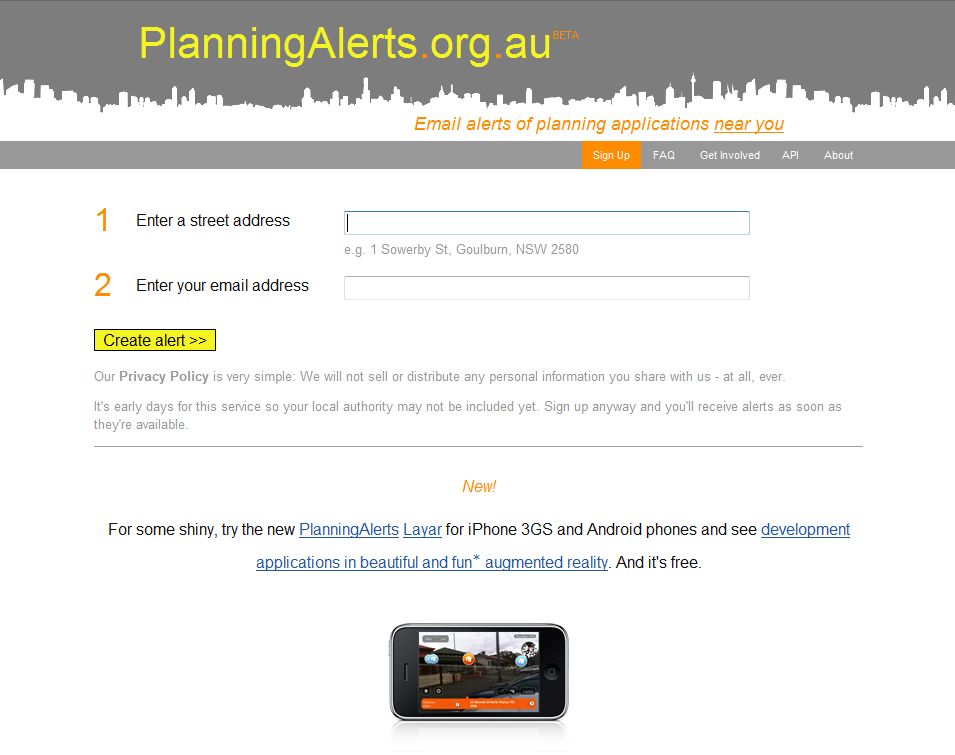
In the last post I wrote about a positive use of web scraping, the software process used to extract data from the HTML mark-up language used on websites. I highlighted Planningalerts, a web and phone app to deliver real-time information gathered from council websites about development proposals in that may affect a specific property.

Now for a look at a social media application which opens the door to web scraping in a much more controversial manner. Foursquare is described by Wikipedia as a web and mobile application that allows registered users to connect with friends and update their location. Points are awarded for “checking in” at venues.

Foursquare website

Foursquare website

Basically, Foursquare broadcasts the user’s location to their friends and if they wish to allow it, to other Foursquare members, based on their smartphone’s global positioning system (GPS).

The process is best described, not on the Foursquare website but in a recent Guardian article. In summary, users “check in” on their phone whenever they arrive at a point of interest so that fellow users know where they are. They can also use their phone to check the names of all the other users in the same area, where exactly they are and if they are with other users

The application is still in its infancy but is already attracting a lot of users. Recently it signed up its two-millionth user, just three months after reached its first million. According to the Guardian:

“Foursquare is now being widely touted as the app which will, after years of anticipation and prediction, mark the beginning of ‘life as a game’ computing. Whatever you do, wherever you go, you will be scoring points, earning ‘medals’, and be in, at the very least, social competition with other users around you.”

However, as the Guardian article points out, this “game” could come with a price – a potentially huge loss of privacy. There are at least three areas of concern. First, by its nature, Foursquare automatically reveals a fundamental item of information, the user’s precise location, which is not disclosed even to the user’s friends by any other social media application. This has implications which are only beginning to be understood.

Second, while they have recently been tightened up, Foursquare privacy settings still require users to actively opt out in relation to key options to share data instead of the other way around. As the recent fracas over Facebook privacy rules demonstrates, this approach can leave users very vulnerable.

This is a particular issue with Foursquare, however, as there is little point to the program unless you choose to release your location information to at least some other users. However, even if you do opt to disclose your location only to your friends, this can still be risky, especially if you haven’t been too discriminating about who your “friends” are.

This risk is also compounded by the way in which the program facilitates the linking of Foursquare’s locational broadcast to a user’s Twitter feed, thus enabling their location to be spread even more widely.

 The biggest concern however, is that Foursquare could be potentially vulnerable to “malicious” web scraping. Unlike the Planningalerts application’s use of web scraping described in my last post, this involves the collecting and collating of private data that users have revealed (intentionally or otherwise) on social media websites rather than gathering public information made available on council or government websites.

Even if a user avoids the temptation to link their own Foursquare, Facebook, Twitter and other social media accounts to reduce the risks described above, someone with the right skills can gather pieces of information from these sites and link it with other publicly available information such as phone directories and electoral rolls to build a detailed picture of that user’s address, employment, lifestyle, friends, associates, shopping preferences etc.

The role of web-scraped Foursquare data could be particularly critical in providing information on the user’s movements on a day-to-day basis. The Guardian sums up the risks:

“The big worry … is who might get to make use of this information. Pick your paranoia. Someone with criminal intent, such as a burglar, identity thief or stalker? Governments, the security services or police? Terrorists? Or a corporation looking to target its products at you with incredible precision?”

This is not to condemn web scraping and similar data-gathering techniques out of hand – as Planningalerts demonstrates, they can provide a particularly effective way of making already publicly-available data even more accessible. Nor is it a criticism of the innovation demonstrated by applications such as Foursquare. It does however provide a strong argument for all social media applications to beef up their privacy measures and to inform users of all the risks involved.

If we are going to march into the brave new world promised by Foursquare and the other locationally-enabled social media apps to follow, we had better do so with our eyes open.

Posted in Local Government, Web 2.0 | Tagged , , | 1 Comment

Web scraping – the Jekyll and Hyde of Web 2.0 (part 1)?

Two media reports this week have highlighted the way in which social media and web 2.0 applications can use “web scraping” in very different ways and for very different outcomes.

Web scraping is a specialised software-based process used to extract data from websites, where it is commonly displayed using HTML or similar mark-up languages. When displayed in this way, it is difficult for conventional software trying to “read” the data to make a distinction between relevant information and the surrounding “noise” of the formatting, a situation complicated by the fact that websites may display similar information using very different layouts.

After the data has been “scraped” from the relevant websites it is collated in a database or some other systematic framework and put to new purposes, possibly not ones that were envisaged by the original creators of the information. The most common examples are the websites which provide on-demand price information for a product selected by the user, based on real-time comparisons between the web pages of various online shops.

Web scraping can be viewed as a specific form of data scraping, or the extraction of data from the human-readable output of any computer, but for the purposes of these posts I will regard the two terms as synonymous.

First, a positive example of web scraping at work. The not-for-profit organisation OpenAustralia, which has already made a name for itself in making information about the federal parliament, parliamentary debates and individual MPs more easily accessible, has just released a new app for iPhones and Android smartphones. The app gives users the ability to locate neighbouring development proposals that may affect a property just by pointing thier mobile phones at the property.

Planningalerts phone app.

Planningalerts phone app.

The app is an extension of OpenAustralia’s already-successful web-based planning alerts service. This allows users log the address of a property and be informed by email of development proposals within either a 200 metre, 800 metre or 2km radius, assuming the property is located within the boundaries of a council that provides this information online in a format that has been scraped by the software.

This is not without its complications. In an interview with the Sydney Morning Herald, OpenAustralia founder Matthew Landauer describes the process as “very painful and error prone”:

“The program clicks on links, fills out forms to do searches, and then when the program finds the web page with the development application it has to extract the unstructured information on the page and turn it into structured information.”

Only 85 of the over 650 councils in Australia are covered by the software, but these include many of the larger ones and others are being added to the system by “crowdsourcing”: members of the community adding the details of the websites of councils which start to place their DA information online.

So far, so good. There would be widespread agreement that this is an appropriate “repurpose” of information which is publicly available anyway. Some councils may be nervous about the way in which the OpenAustralia phone and online applications raise the bar in terms of who gets notified about DAs, but hopefully most will take a positive attitude and cooperate with this initiative by making information available in a more standardised, software-readable format. In turn, this and other eGov initiatives may lead to councils and other levels of government making a wider range of data available in computer-accessible formats.

However, web scraping can be used in different and less benign ways. In my next post I will look at a new application which raises major questions about the use of web scraping and related techniques in relation to social media websites.

Posted in Local Government, Social Media, Web 2.0 | Tagged , , , | Leave a comment

If the iPad is the answer, what is the question?

Recently I extolled the virtues of netbooks as an ideal device for travellers, due to their light weight, long battery life and very low (sub $500) cost. When the iPad was subsequently announced I assumed that it would be a “netbook killer”. However, after reading about them and having a brief play with one, I’m not so sure. In fact, once all the current enthusiasm for the iPad dies down, I don’t know exactly what its role will be.

This is not to knock the iPad, through which Apple has done to the tablet computer what it did through the iPhone to the mobile phone – remake the current crop of disparate poorly-implemented devices as a well-executed package integrated with a great, intuitive interface which can be used as a platform for a range of applications. 

iPad

iPad (from Wikipedia)

The difference of course is that the mobile phone was already a ubiquitous device when the iPhone came along. Millions of people already had the things and knew roughly what to do with them, though Apple was certainly successful in making a better interface and extending the range of phone-based activities.

 In geological terms, the mobile phone market was not so much as a niche as a very large depression, one only partly filled by a lake of existing devices which the iPhone successfully swamped. To labour the metaphor, the iPhone then went on to fill up most of the neighbouring niches and creating new ones, courtesy of the vast range of iPhone apps.

By comparison the tablet was only a very small niche before Apple arrived. While the iPad is likely to fill this relatively small hole, this is not that significant an achievement. Apple and the apps providers also need to fill a lot of connected niches  – and create new ones to fill as well – to give the iPad critical mass.

This is complicated by the fact that, because of its size, the iPad is unlikely to become a ubiquitous device like the mobile phone – for a start, you can’t just put one in your pocket, or indeed the average handbag, as you zoom out the front door. This will obviously limit its numbers, unless a great killer app or two can be found.

Such an app is unlikely to come from the ranks of iPhone apps ported to the iPad – after all, the iPad can use all of these already. It will likely have to be something new which is best suited to the iPad form factor. One suggested example is the delivery of newspapers, though electronic paper could well do a better job of displaying these (that is, if anyone ever actually releases electronic paper displays on a commercial basis). It may be that the killer iPad app is yet to be written.

This brings me back to the iPad’s potential as a netbook killer. There is little doubt that the iPad may be the ideal device for some travellers, especially those who just want to send and receive emails, look up websites (provided they don’t use Flash) or upload and post holiday photos (provided they buy the appropriate attachment). It also has almost twice the battery life of a netbook and would no doubt suit many (well-heeled) tourists.

However a netbook can do all of these things, albeit less elegantly, and is easier to use for anything more complex such as word processing or photo editing. It is also a lot cheaper – ironically, your average business traveller who can afford to buy an iPad may prefer to stick with a netbook because it is much easier to use the latter to type up that last-minute report on the early-bird flight to Melbourne. This response is also consistent with the suggestion that iPads are best thought of as content consumption rather than content production devices.

While I can’t predict whether such a killer iPad application will emerge or what that application might be, it’s interesting to consider how the iPad might be used in relation to some of the Web 2.0 applications I have previously reviewed. Those workshop or conference tools such as Poll Everywhere or iMeet which require interactive, real time participant input might benefit the most. MyCommittee also has potential, but only once it can be used to run actual committee meetings themselves. 

Perhaps more intriguing are the web-based mind mapping applications I reviewed last year, such as Comapping, Mindomo and MindMeister. These may also require some adjustment but they would offer the potential for brainstorming or mind mapping for small groups using iPads.

In summary, while the jury is still out on the extent to which the iPad will succeeed, there is a lot of potential to use the device to capture feedback interactively in meetings, workshops and conferences which should be explored by NGOs and small businesses – that is, if you can afford to buy the things in the first place. I’d be interested in any suggestions about other Web 2.0 applications for the NGO or small business sectors that are designed for iPads or which might be particularly useful in the iPad format.

Posted in Community Sector, Local Government, Meeting tools, Mind Mapping, Web 2.0 | Tagged , , , , | 1 Comment

iMEET! – a big step towards 21st century conferencing

A while back I reviewed Poll Everywhere – a Web 2.0-based tool for organisations to conduct polls and surveys at meetings, workshops and conferences. The software enables attendees to participate and vote via SMS text messages from their mobile phones in real time. 

iMEET! is aimed at a broadly similar market and is also web-based, but with a somewhat different direction and emphasis. I was fortunate to get some experience in using iMEET! at a workshop recently (disclaimer: I was also helping to run the workshop, though I had nothing to do with the choice of facilitator or technology). 

Just as Poll Everywhere introduced a modern take on voting in conferences, iMEET! does the same for the traditional process of gathering and processing workshop feedback. 

I think everyone has sat through one variation or another of the seemingly timeless process of workshop brainstorming sessions at conferences. You know the drill – everyone breaks into small groups, debates who is going to be the scribe and then leaves that person with the thankless task of recording the discussions on multiple sheets of butcher’s paper. 

These are then used to report back to the whole group in some sort of plenary session – and then after the meeting some poor soul has the job of transcribing a mass of notes, scrawled in different hands, into some sort of coherent report of the outcomes. The process is time-consuming, and to be frank, unexciting, which means that conference organisers all over the world have to deal with the problem of conference participants nicking off before the dreaded final report-back plenary session. 

Relatively few technological innovations have impacted on this process since, it seems, the beginning of time. One was the introduction of electronic whiteboards, but these are clumsy and relatively expensive and most venues usually have only one or two. They really only lend themselves to being used by a small group holding a plenary workshop session. 

Other innovations such as the use of small networked voting pads have not really caught on because of their proprietary nature. Laptops have also been used, but while these have facilitated the process of recording workshop outcomes, there has not been an effective application to integrate the results in a plenary session-friendly discussion format. For most of the workshops I’ve attended and convened it’s been the good old butcher’s paper, even though butchers themselves have long since moved to plastic! 

Enter iMEET!, which is making a strong claim to being the game-changing application for conferences and workshops. It uses lap-tops, but integrates them in a very innovative way, linking them wirelessly so that information can be entered into a web-based iMEET! database directly. 

To quote the company’s website:

“[This] information is stored on a central server and made available to all other laptops, and projected via a data projector onto a large screen for all to view. All that you need to be able to do is enter content via the keyboard into the intuitive interface on the computer, using a standard web browser.” 

In practice the system is easy to use. Each small group is allocated a laptop and in most cases still has to appoint someone to record the outcomes of the workshop (or “focus session” in iMEET!’s parlance). However, instead of scribbling on large sheets of paper, the scribe enters the comments into an interface on the laptop which is a little like an on-line forum (in theory each member of the group could take turns to enter their own comments, but having a single person as the group’s recorder provides more consistency and helps to ensure that the recorded comments are mediated by the whole group in some way). 

imeet image 1

Example of iMEET! screen as seen by a workshop focus group (from the iMEET! website)

Drop-down boxes can be added by the facilitator for groups to categorise their comments as they make them – for example, they could be asked to characterise their comments as either, say, positive or negative, or as short, medium or long term actions. Typically, each group sees only its own comments on its laptop, however, the responses are brought together on a single computer to be reviewed by the workshop facilitator and displayed to the whole workshop on a large screen in real time, with the group making each comment clearly marked. 

During the session itself or immediately afterwards the facilitator can prioritise and categorise the comments, bring together related ideas or identify potential conflicts. The fun really begins in the subsequent plenary session, which is much faster and more interactive than usual – no more succession of people dragging sheets of butcher’s paper up to a podium and reading out their hand-written comments. 

Instead the outcomes are immediately available and the facilitator can lead the whole group in making sense of them, identifying key issues and seeking responses from the audience. The material can be reshaped or expanded as a result of input from the whole group. For example, a set of options for future action can be selected and the participants invited to vote on them. As with Poll Everywhere, the outcomes are displayed in real time, though in iMEET!, the number of laptops available at the workshop is obviously a limitation. 

iMEET image 2

iMEET! screen set up for a work group to vote on options (from the iMEET! website)

After the meeting the final output can be delivered as a Word or Excel document within 24 hours of the event – or the iMEET! session left open for further online comment by participants (via a secured website) with output provided at a nominated time. 

Verdict: having seen iMEET! in action I can vouch both for its effectiveness and for the speed with which the results were produced. I was very impressed, as were most of the workshop participants. 

There is one important difference between iMEET! and programs such as Poll Everywhere and MyCommittee (which I have also reviewed) – even though it is web-based, iMEET! doesn’t lend itself to being treated just as an off-the-shelf product. It really needs at least a preliminary consultation with the consultancy team behind it (Australian-based Global Learning) to understand its full potential and to set it up properly. 

It also works best when workshop participants can be split up into relatively small groups – say no more than five or six people per laptop. This makes it easier for everyone to see what is being recorded and also allows the group’s recorder to keep up with the input. 

Global Learning can provide facilitation services as well as the laptops, or the client can use their own. Any reasonable PC or Mac laptop with reasonable battery life will do, as long as they can access the internet directly or through a wireless LAN. Even netbooks could be used, though the latest crop of CULV laptops with larger screens might be a better bet. 

As a result of the number of options involved it is probably best to get pricing information directly from iMEET!, though I understand that it is available on a conference-by-conference basis. 

The really interesting thing is how iMEET! rounds out the suite of meeting and workshop-related products which are relevant to small and medium organisations, complementing applications already in this arena such as MyCommittee and Poll Everywhere. 

While there is some degree of overlap between these products – particularly between Poll Everywhere and iMEET! – it’s best to think of how these applications can be used together creatively. For example, MyCommittee could be used to setup a meeting, and iMEET! to run workshops or Poll Everywhere to record votes on important issues during the meeting . Or iMEET! could be used to workshop key options through small groups prior to a major conference at which Poll Everywhere is used by a larger group of participants to vote on these options. 

In summary, iMEET! fills an important, if hitherto largely ignored, niche. It could help you to make your next conference much more productive and who knows – the dreaded end-of-day plenary could even become a lot more interesting for you and your participants.

 As always, you should look at the issues I have raised in previous posts about avoiding problems with Web 2.0 applications in evaluating iMEET!


Posted in Community Sector, Meeting tools, Polls and Surveys, Web 2.0 | Tagged , , , | 1 Comment

In praise of netbooks

Sometimes you come across a tool so useful you wonder how you worked without it.

Over the past few months I travelled extensively – and for the first time with a netbook. I had a fairly typical example, an MSI Wind U100+ (where do they get these names?) with an Atom processor, 2GB Ram and a 160GB hard drive running Windows XP. It is a rather natty blue and apart from a slightly-tempremental wireless card, performs perfectly. Its light, easy to pack and can do most things a laptop could do a few years ago. Its certainly capable enough for word processing, web-surfing and email, which make up what 90% of travellers do 90% of the time.

Many ultra-portable laptops also have these virtues, but in my view these aren’t the main reason for buying a netbook. There are two reasons why netbooks make the ultimate traveller’s tool: the first is their phenomenal battery life – around five hours with a 6-cell battery, which is still better than most “conventional” laptops. The second is how cheap these things are – I picked up mine for under $A500. This means that if the thing gets stolen it isn’t the end of the world (except for the data you have on it, of course).

I’ve travelled with laptops before and its great to have a comparatively large screen and a full set of programs, but their comparatively poor battery life and the fact that they are considerably more expensive can make them more of a liability than an asset.

The wider issue, however, is how easy it is to access to social media and online tools is when you are on the road, irrespective of what device you are using. There is of course wireless broadband, but this can be an extremely expensive proposition, especially overseas. Access via wi-fi can be extremely variable – it can be free in hotels, but elsewhere often involves casual user charges, where it is available. This means that you may have to lower your expectations of being able to access key programs if they are available only online – or look at those applications which can be downloaded and used offline.

Posted in Web 2.0 | Tagged | 1 Comment