Big Business carves up the internet – part 2

I had intended to return a lot earlier to my discussion (see part 1) about how major IT companies are trying to lock in users through the vertical integration of their software, the introduction of annual or monthly subscriptions to replace perpetual licensing of their products and by reducing the interoperability of their competing software “eco-systems”. All these strategies have major consequences for the future of the internet.

It had been my intention to look at how some smaller software companies had reacted and the consequences for councils, NGOs and small organisations. Well, while it’s no excuse for the long delay, the intervening period has seen some interesting shifts and a change of heart by one vendor.

The primary example I was going to choose, Mindjet, had caused huge angst in its user community. Mindjet has the largest customer base among sellers of mind mapping software. After dabbling in the provision of a “lite” online version which allowed mind maps to be shared and edited collaboratively and the acquisition of a number of web-based task management software, Mindjet with little warning moved its entire product line to a subscription model, a decision that angered many users as much as for the way in which the changes were made as for their intention.

The problems in execution were many. First, the company intentionally or otherwise let its resellers leak the news to users instead of announcing it publicly themselves. The cost of the subscriptions was relatively high – in some jurisdictions users would be (and are) paying more annually than they would for Microsoft Office 365 subscriptions, which include the entire Office suite. And unlike Microsoft, Mindjet was also not offering a perpetual licence alternative. In addition Mindjet’s package had a cobbled-together feel about it; while the flagship Windows desktop program MindManager (confusingly renamed Mindjet) is excellent and the online version is adequate, the versions for Mac and mobile devices are feature-poor and the overall integration of all these elements with each other and the new task management application is still patchy.

The new model and its poor implementation brought a strong reaction from customers, especially individual users and those in companies that were trying to promote mind mapping to their colleagues and superiors. I won’t go into the impassioned pleas by and lively arguments between MindManager aficionados (like me) which can be read online (for example, here), but I think it is fair to say the company was unprepared for the reaction. It responded in a number of ways, for example offering one-off discounts for existing users, splitting the company’s offering so that desktop users who didn’t need the online services didn’t have to pay for them (and vice versa), but these concessions did not satisfy many users.

The company’s position was further undermined when it was revealed that it was still offering perpetual licences to academic and government users, some with substantial discounts, despite forcing retail purchasers to move to the subscription model. Mindjet’s Account Services Director admitted this, but would not discuss the reasons, stating somewhat bizarrely that: “Company policy prohibits me from providing a more detailed public explanation of pricing strategy”.

Then a few weeks ago Mindjet suddenly and quietly ran up the white flag. A link appeared on its website, offering a perpetual licence combining its Windows and Mac desktop products for an introductory price of US$299 (reduced from $349) or an upgrade price of $179. The perpetual licence version has reverted to the old name of MindManager, though the product appears to be identical to the subscription version which keeps the new name of Mindjet.

There are a number of interesting lessons to be learnt from this for other companies contemplating going down this path. The first is that user responses to controversial change can be mobilised very effectively in an online era, even if the impact is very uneven. Smaller more specialist businesses like Mindjet are much more likely to be hostage to their users than companies the size of Microsoft.

Second, execution matters as much as intent. If Mindjet had been more open with its users, if it had waited until it had improved the individual products in its “basket” and ensured that they were properly integrated it might have received a more favourable response to the changes. The implementation was also flawed by trying to charge too high a price for the subscription version; like it or not, even if you are a small company offering a specialist product, people will still compare the price of your package with those offered by much bigger companies like Microsoft. And even Microsoft did not go so far as abandoning perpetual licences all together.

The third lesson is that you really need to understand that the subscription model may not suit all your current or prospective users. Obviously Mindjet was hoping to parley its success in specialist desktop mind mapping by expanding into corporation-wide task mapping and management. Whatever the intention, the new subscription model did little to address the needs of the “traditional” individual users who make up a significant proportion of its current market and who often proselytise the benefits of mind mapping to and within these companies. Many users also disliked the prospect that they would be unable to access or edit their maps stored on their own PCs or their company’s servers after the subscription ran out; at least with Microsoft Office there are many third-party products that will read and write Office files.

The counterpoint to this is the fourth lesson; the need to really understand what you are letting yourself in for when you try to expand into a new market. Mindjet’s desire to expand beyond the confines of the fairly specialist field of mind mapping is understandable, but its new “battlefield” of corporate task management is a very different ballgame. There are already a number of established players in this area, and the prospective clients are likely to want much more mature and stable products than Mindjet’s offering, even if it has the attraction of a map-based interface.

The fifth lesson is that you have to avoid hypocrisy in dealing with your customers. If Mindjet had adopted Microsoft’s “carrot and stick” approach of making the subscription price very attractive but also offering a perpetual licence at a less attractive price most users would have grumbled but gone along with it. They will also accept differential pricing for bulk purchases, particularly in the government, education and non-profit sectors. What they really dislike however is any attempt to restrict their ability to purchase a licence in a particular way while another class of user is allowed to continue clandestinely with “business as usual”.

The sixth and final lesson is learn from your mistakes. Mindjet have backed down and made a perpetual licence available. They have also to their credit allowed these issues to be debated openly in forums linked to their website (though I notice they have now moved some of the more controversial threads to the relative obscurity of the archive section). The process and the outcome still have a messy feel about them however and it is unclear how Mindjet will tie up all the remaining loose ends.

A couple of final observations: it is understandable that many software providers are attracted to the subscription model. It reduces delivery costs, guarantees repeat business and makes it easier to roll out updates. However it will not suit a number of customers, especially many individual users. It also doesn’t suit those who make only occasional use of a program and who are therefore prepared pay for updates only every two or three years instead of being locked into annual or even monthly renewals.

More importantly, software companies have to realise that by itself the subscription model is also an inadequate response to the biggest threat may of them face from new players in the marketplace – the rise of the app, usually tied to a mobile device, which undertakes only a specific set of tasks but does these well and at a fraction of the current price of traditional software. The appearance of the app is a paradigm shift which could make arguments over the competing virtues of perpetual licence and annual subscriptions for large software packages largely redundant, along with the companies making them.

Posted in Mind Mapping, Social Media | Tagged , , | 1 Comment

Big Business carves up the internet – part 1

Is the free, open and somewhat anarchic era of the internet drawing to a close? If so, what are the implications for small organisations?

There has been a lot of media attention in recent months to how various governments are attempting, with varying degrees of success, to control the internet. However governments are not the only culprits. Recently several articles have highlighted how major IT companies are turning the internet into a closed shop of “gated communities”, as one commentator put it (see Wired  and Sydney Morning Herald articles).

Basically the thesis of these articles is that the big players like Apple, Google, Facebook, Amazon and Microsoft are all trying to lock in their users by the vertical integration of their software and, in many cases, hardware. In doing so they are consolidating not only market share but their effective control of the internet itself.

It’s useful to look at how this is being achieved. The first step for most of these companies was to create attractive “eco-systems” of software linked to and integrated with their core products. This has been occurring for a while; the oldest example, Microsoft Office, actually predates the web.

Apple and Google are probably the most vertically integrated and internet-savvy examples, with not only software but also their own hardware, operating systems and browsers. As well as in-house development, vertical integration has often involved buying add-ins and complementary software created by other companies. This was done to remove potential competition as much as to fill gaps in the each company’s product range.

This process started in the PC era and it has been challenged in recent years by the rise of mobile devices. As well as eclipsing computers as the dominant means of accessing the internet, these have spawned the creation of thousands of low-cost apps. In turn these apps are making profound changes to the dynamics of software purchase; why pay for expensive desktop software when a few apps on your smartphone or tablet may achieve much the same result, all for a total cost under $10?

While this development caught some companies on the hop it also provided opportunities for others, especially the two companies which have led the smartphone and tablet revolution, Apple and Google. Each has used the rise of apps to reinforce the boundaries of their respective software and hardware ecosystems. While they don’t produce the vast majority of these apps, these companies control their sale and distribution, generating an additional income stream (particularly in the case of Apple with its 30% share of all app takings).

The next step for these companies is to erect barriers to make it harder for “outside” users to access their software or for their own users to leave. Obviously Apple are past masters of the “walled garden” approach with iTunes and iOS, but recently others began playing this game even more aggressively – for example, Google has removed support for Microsoft’s Exchange ActiveSync from Gmail and for Internet Explorer 8 from Google Apps. Other companies such as Facebook and Twitter are employing similar tactics.

The result isn’t pretty and obviously raises some serious questions about the internet’s future. As Wired commentator Ryan Tate put it: “… imagine if Ford built a series of freeways where Chevys, Hondas, and other makes were banned – that’s Google+. Imagine if the Chevy Malibu drove at half speed on anything other than Chevy-owned freeways – that’s Facebook’s Instagram….“

The next step down this track for many companies is the roll-out of proprietary online storage and software. While there are some independent players such as Dropbox, it is the big companies which are now pushing their cloud-based storage solutions the hardest – Google with Google Drive, Apple with iCloud and Microsoft with Skydrive.

The online data storage and software applications are free or relatively cheap at least to start with, but of course there is a catch; each works best (or only) with the relevant company’s PC-based operating systems, browsers and software and online storage.

The final step is the adoption of subscription models to replace software purchase. Not only does this generate a consistent income stream and reduce support and distribution costs, it also further locks in users’ data, whether or not they (the users) have been persuaded to store this data in the company’s cloud. Users are also unable to reduce costs by skipping upgrade versions, a practice common in small organisations; stop the subscription and (depending on its format) you may not be able to access your own content, no matter where it is stored.

The subscription price also looks cheap, especially as it is usually expressed as a monthly payment, a model familiar to the users of mobile devices. And of course discounted subscriptions are offered for early adopters and those that that take a bundle of products. Then it is easy for companies to start gradually increasing the subscription price.

I’ve summarised this process in the diagram below. Some smaller software companies are now trying to emulate this pattern, with varying degrees of success. These companies usually have relatively specialised applications and also lack the resources and the critical mass of users that the big companies have behind them in rolling out this strategy. In future posts I’ll consider a couple of interesting examples and also discuss the implications for councils and small organisations.

Seven steps to Internet domination - and locking in your users

Seven steps to Internet domination – and locking in your users

Posted in Cloud, Community Sector, Local Government, Smartphones, Social Media, Web 2.0 | Tagged , , , , , , | 2 Comments

iPads and fieldwork apps – room for more?

You would think that with 700,000+ apps in the iOS app store and a similar number available for Android devices, everything would have been well and truly covered. So I believed until someone asked online recently about tablet apps specifically designed for fieldwork and field note-taking, a task for which iPads would seem ideally suited. I decided to research this and to my surprise found that the range is relatively limited.

Of course, a lot depends on what you mean by “fieldwork” and “field notes”. Those wanting to undertake field surveys and interviews or general data collection are reasonably well catered for with a number of apps, as discussed at the Teach with your iPad site.

However, those people involved in the natural sciences and/or who need to complete physical site assessments have more detailed needs. While the requirements vary with the specific discipline involved, these could include:

– Date, time and location coding
– The ability to incorporate photos, audio and video, as well as links to files and online material
– Unstructured fields for notes, preferably with the ability to enter handwritten notes and drawings
– User-defined fields for structured data
– The ability to export in a range of formats and to integrate with other apps and programs
– Facilities to store field notes both on the iPad and in the cloud
– The ability to categorise and search data easily.

A search of the iPad app store reveals only two apps specifically aimed at this market; the free Fieldnotes LT and its sibling, the full-featured (and charged for) Fieldnotes Pro which is also available in Android format.

The Pro version of this app can collect most of the data types suggested above and has most of the other requirements, including the ability to export in a number of formats such as .kmz files which can be opened in Google Earth. However, a few features are missing or are a bit limited – for example, Fieldnotes Pro has little in the way of search facilities (ffor a more detailed review see SmokinApps)

20121202-234146.jpg

The only other contender which has most of these features is the jack-of-all-trades of note-taking software, rather than something which was designed specifically for fieldwork – Evernote. Evernote lacks a few more features from the list above than Filenote Pro, such as the range of export format options and it is more cloud-dependent, but it also has better search features and much greater integration with a wider range of apps, including PC and Mac versions.

My initial impressions are that both are useable apps, but they also have their different and significant weaknesses and you really should play with each of them before making a choice. But for the moment, this is the only choice you need to make – from what I can see, there are no other real contenders. Hopefully either of these apps will embrace some of the features they currently lack, or something will emerge to challenge both Evernote and Fieldnotes Pro.

Posted in Uncategorized | Tagged , | Leave a comment

An even longer break

Another even longer break with fewer excuses. However we hope to be posting to Sociamind and our companion blog, StrategicMatters, on a more regular basis in future.

Alex Gooding

Posted in Uncategorized | Leave a comment

Listening to Twitter- some key tools for your NGO or Council

Serendipity is not uncommon in social media. People find new and unexpected ways of using social media tools all the time. Of course, the same thing happens with PC-based software, but the web allows people to develop new uses for social media and then to spread these applications far more cheaply and effectively.

Twitter is a case in point. The 140-word microblogging service is still seen by many as an exercise in narcissism but at a deeper and more serious level it have found uses in areas as diverse as providing feedback on brands and products, distributing alerts for upcoming events, giving real-time responses to speakers in current affairs programs and even spreading information among activists demonstrating against dictatorial governments.

Both fed and been supported by the growth of a small forest of add-ons, Twitter is rapidly becoming a mainstream communication channel, which means it needs to be considered as part of the social media strategy for all NGOs, councils and other small organisations.

This presupposes of course that you have a social media strategy. The reasons for NGOs and councils to have a strategy and what it should do have been written about in numerous blogs, but the simplest argument is the most compelling – the hundreds of millions of people around the world who use various forms of social media on a daily basis.

What your social media strategy should do obviously will depend on your organisation’s objectives, projects, activities and users (both staff and customers/clients), but the basics are summed up in this post by Spurspectives. I’ve expanded a little on the standard components identified in that post to form this list:

  • Adding a blog to your website (of course you can have multiple blogs, but don’t underestimate the demands of keeping even one up to date);
  • Setting up a page for your organisation on Facebook;
  • Sharing videos (for example through YouTube) and posting podcasts on your website about your organisation’s policies, projects and events;
  • Connecting with colleagues and community leaders through LinkedIn and then joining LinkedIn networks relevant to your organisation;
  • Using Twitter to post current news and updates about your organisation. These can include links to your blogs, videos or podcasts. You will need to decide who exactly has authority to post tweets on behalf of your organisation and what they will tweet about.

This list is a good start, but one key element of a good strategy is that you should not just see social media only as a one-way street to disseminate information about your organisation. Social media is about a conversation, or rather thousands of many-to-many conversations, and your strategy should be more about how to engage through these conversations with your users and those you are trying to influence.

This means that you need to listen to your target audience as well as broadcast to them. All of the social media components suggested above provide opportunities for feedback, but this is one area where Twitter shines, given that anybody with an account can respond instantly and publicly.

I don’t intend to provide a general intro to Twitter here – this has been well-canvassed in guides like the one on Victorian State Government eGov website or this local government-related blog from the UK. Instead I’d like to look specifically at how to receive and handle the rich stream of responses that Twitter provides.

Twitter is like a fast-moving river, with thousands of tweets posted every second; while you can use Twitter to search for your organisation, this is difficult if it has a long name. To help you can start using a hashtag for your organisation or its services in your own tweets. A hashtag is a short, distinctive is name preceded by the hash key (for example, #wikileaks or #cityrail) which used in tweets. If the hashtag catches on and other people start using it, searching for tweets relating to your organisation will be much easier.

Once you do this you can simply dip your hand into the “twitterstream” in every now and then to see what people are saying about you by using Twitter to search for your hashtag, or a filtering tool such as Tweetdeck, which allows you to display searches for multiple topics. You could then provide these as public feedback on your website by using applications such as Twitter widgets or Twitterfeed.

However, while Twitter and Tweetdeck can yield some interesting posts in real time, they don’t allow you to store the results for later use. For a more systematic approach you need software that allows you to filter and then extract the resulting list of tweets to examine outside of Twitter.

Tweetdoc allows you to enter a hashtag or other search term and then set date and time range and limits on the number of tweets to display. The resulting list is displayed in a PDF file which can be stored offline for later reference.

A similar service is provided by SearchHash. As the name suggests this concentrates on filtering by hashtags (though it does seem to work with other search terms) but is a bit more flexible than Tweetdoc in allowing export to an Excel document, which is easier to use as a basis for further research. Meanwhile other tools such as the Archivist provide a snapshot of statistics such as the number of tweets over time, the  top users, main sources, etc.

Be aware, however, that this is a fast-changing area. Search applications such as Searchtastic which were widely recommended only a few  months ago have already ceased operations. Others such as TwapperKeeper have removed their export facility, claiming that Twitter has alleged that it infringes its Terms of Service.

Setting up a Twitter account and then searching for your organisation’s hashtags or other topics related to your services is an important start, but you can do so much more with Twitter. In a future post I’ll look at how you can use it to help in running conferences and forums.

Posted in Local Government, Social Media | Tagged , , , | Leave a comment

The long break

Apologies to anyone following this blog. I’ve had a long break due to the death of my mother at the end of April. I’ll be resuming posts very soon.

Posted in Admin | Leave a comment

Cloud storage and privacy – the dark side of the silver lining

A report of the Senate Environment and Communications Committee released this month may have profound implications for small businesses, councils and non-government organisations that use cloud storage for personal information relating to their clients or customers.

The Committee’s report, titled The adequacy of protections for the privacy of Australians online was prepared in response to recent significant advances in online technology and its use for social media and cloud computing. The committee was particularly interested in the impacts on personal privacy and the protection of data.

The report contains nine recommendations. Key points include:

  • Small businesses which hold substantial quantities of personal information, or which transfer personal information offshore, should be subject to the requirements of the Privacy Act 1988.
  • All Australian organisations which transfer personal information overseas, including small businesses, must ensure that this information is given the same protection as that provided under Australia’s privacy framework.
  • If an organisation overseas collects information from Australia, this information should be protected by the Privacy Act.
  • All Australian organisations that transfer personal information offshore are fully accountable for protecting the privacy of that information.

The Privacy Minister Brendan O’Connor has highlighted in an interview with News Ltd that cloud storage was a particular concern.

“While some ‘cloud’ providers are located here in Australia, many more are located overseas,” he said.

“That gives rise to difficult jurisdictional issues, particularly where the laws of two or more countries could potentially apply.”

The Minister has indicated that the recommendations will be implemented.

“This is an important development that will prevent organisations from trying to avoid their obligations under the Act by transferring the handling of personal information to countries with lower privacy protection standards,” Mr O’Connor said.

This point is especially relevant as many countries do not offer the same degree of protection for personal data stored on servers in their jurisdictions against it being accessed by government agencies, or even shared with businesses.

If implemented, the recommendations will have obvious consequences for organisations large and small across all sectors that have made explicit decisions to save costs by moving client data to cloud storage. Even if they have received promises regarding the location of data storage facilities and their security, these assurances are very difficult to check.

However, these are not the only organisations that may be caught up if the recommendations are implemented. The buzz around cloud computing and storage – not to mention the potential cost savings - has encouraged many small organisations to experiment with online applications for their day-to-day computing, such as Google Docs, which rely on cloud storage. The files generated may include a range of personal data which could be covered by the proposals.

In addition, many organisations that continue to use “traditional” PC-based software also rely on cloud storage applications such as Dropbox for data backup or portability. So even if an organisation’s primary storage of personal data is located in its Australian offices, additional copies may be kept on an overseas server and would therefore be caught by the recommendations. Furthermore, the current exemption from the requirements of the Privacy Act enjoyed by small organisations would be removed, even if they do not store data overseas.

While the Senate committee report offers sound arguments for the proposed changes and nobody would deny the fundamental right of people to expect high standards of privacy to protect their personal data, the government needs to work closely with all organisations including small businesses,  NGOs and government agencies as well as cloud storage and software providers to ensure that implementation of these recommendations is not too costly or onerous.

Posted in Cloud, Social Media, Web 2.0 | Tagged , , , , , | 2 Comments

Now for something completely different: MindManager importing tricks 2

In my last post I explained how to import tables of tasks and other relatively simple information from Word and Excel using Outlook and converting them into MindManager (MM) maps. There are times however when this approach isn’t appropriate, for example if you have non-task-related data with multiple fields, for example a conference attendance list or product catalogue.

You could of course consider using Outlook, at least to import contact-related data, but there is probably a greater risk of messing up your existing Outlook contact information than there is of “temporary” task data interfering with your Outlook tasks.

So, how do you do this without Outlook? First, consider the following hypothetical workshop attendance list:


Name Organisation Position Phone
Ethyl Cameron Acme Pty Ltd Director XXXX AABB
Thomas Merkel Acme Pty Ltd Manager XXXX AACC
Jane Obama Acme Pty Ltd Manager XXXX AADD
Andrew Gillard Zenith Pty Ltd CEO YYYY GGFF
Sarah Sarkozy Zenith Pty Ltd Group Manager YYYY GGHH


If you have a table like this in Excel you will need to import to Word. Once there (or if it is already in Word) you can easily import it into MM but you have to do a few things first, otherwise it will just be a mess with all the data concatenated into a single topic per row.

It was Andrew Wilcox who first described the underlying “trick” to get around this, which is to apply Word’s inbuilt heading styles to each column, say heading 1 style to the first column, heading 2 to the second column and so on, so the table would look like the following (it’s helpful to turn off Word’s heading numbering):


Name Organisation Position Phone
Ethyl Cameron Acme Pty Ltd Director XXXX AABB
Thomas Merkel Acme Pty Ltd Manager XXXX AACC
Jane Obama Acme Pty Ltd Manager XXXX AADD
Andrew Gillard Zenith Pty Ltd CEO YYYY GGFF
Sarah Sarkozy Zenith Pty Ltd Group Manager YYYY GGHH


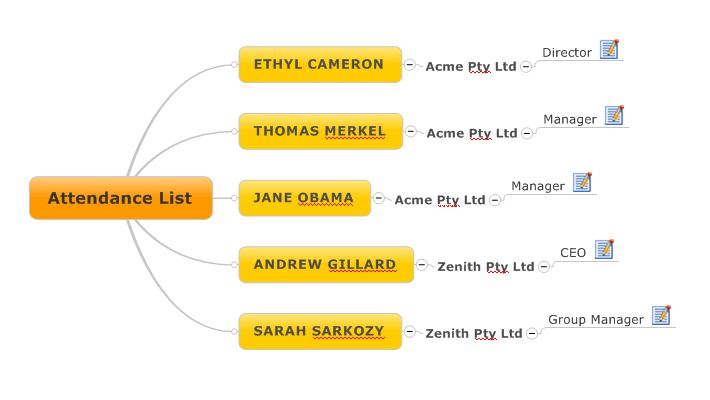
The table can then be imported by highlighting all the required rows (without the header row) then pressing the MindManager button to import to MM.  The data in any column which does not have a heading style (such as the phone numbers) will be treated as topic notes, so the above ends up looking like this as a MM map:

MindManager example map 1

MindManager example map 1


This is fine for a simple table, but what happens when you want to import data to create a more hierarchical map with multiple levels, for example the previous attendance list sorted by organisation?  The first step is to take this list (either created in Word or imported from Excel) and place the organisation column first, grouping the employees by organisation name using Word’s sort function. Then apply Word’s heading styles as previously described so the table looks like this:


Organisation Name Position Phone
Acme Pty Ltd Ethyl Cameron Director XXXX AABB
Acme Pty Ltd Thomas Merkel Manager XXXX AACC
Acme Pty Ltd Jane Obama Manager XXXX AADD
Zenith Pty Ltd Andrew Gillard CEO YYYY GGFF
Zenith Pty Ltd Sarah Sarkozy Group Manager YYYY GGHH


The next step is to leave the first name of each organisation but replace each of the repeat names for the same organisation with a simple carriage return/line feed (it’s always handy in Word to make these visible) in the cells below.  This should leave only one occurrence of each organisation name, which should appear in the first row relating to that organisation’s employees.

Then you have to do something a little obscure – retain the Word heading 1 style for the organisation names but highlight the subsequent carriage returns in the table cells under each organisation name in this column and reformat them with Word’s default normal style.

The name and position columns should be formatted as before. Unfortunately I haven’t found a way to import information into MM topic notes using this method, so in this example the phone number column has been given the same level three formatting as the position data:

Organisation Name Position Phone
Acme Pty Ltd Ethyl Cameron Director XXXX AABB
Thomas Merkel Manager XXXX AACC
Jane Obama Manager XXXX AADD
Zenith Pty Ltd Andrew Gillard CEO YYYY GGFF
Sarah Sarkozy Manager YYYY GGHH


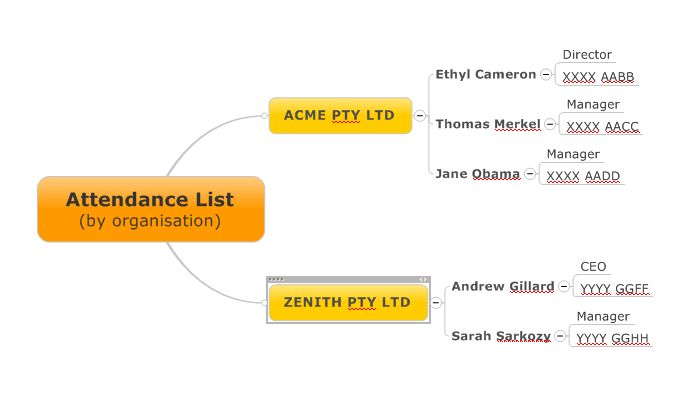
Proceeding as before to export the table to MindManager, the following map is produced:

MindManager example map 2

MindManager example map 2


This shows the attendees grouped by their organisation. Of course you could use the same trick to group them by position, or to produce a map of a catalogue grouped by product type, shelf location, etc.

In my next post I will discuss using Word to import task-related data especially when it is grouped under headings. Unfortunately this is a lot more complex to achieve.


Posted in Meeting tools | Tagged , | 3 Comments

Now for something completely different: MindManager importing tricks 1

As well as writing about social media and small non-profit and public sector organisations generally, one thing I always intended to do through this blog was to write the occasional article about mind mapping software and in particular MindManager (MM).

In fact I have written about mindmapping software before because of its particular usefulness to small organisations, but I thought I’d write something this time for the nerds this time especially those who are reasonably proficient users of MindManager which is the leading PC-based mindmapping software available on the market at the moment.

This exercise was prompted by an innocent query on an MM forum about creating maps from Excel files. While it is possible to link to an Excel spreadsheet, Mindjet (the publishers of MindManager) have so far refused to provide a facility to directly convert an Excel file into a mindmap (or vice versa).

While a number of third-party solutions exist for exporting to Excel, there are few that provide for importing spreadsheets in this manner. This shortcoming also affects other areas; while MM does have extensive capabilities for importing from and exporting to Outlook and Word, it doesn’t work that well with tables generally.

Now I don’t pretend to be an MM expert but I have used it for a few years and the following is the result of my experimentation with MM, Excel, Word and Outlook. I’d welcome any feedback if somebody has come up with simpler approaches.

OK, so you have a table of information that you want to turn into a MM mindmap. How best to approach this depends primarily on two things; the nature of the data (for example, whether it’s a straight-forward list of task-related information or a multi-levelled table of data) and the format of the table (mainly whether it’s in Word or Excel).

As a general rule of thumb, the easiest approach is to use Outlook as your intermediary. This applies especially to task information; all recent versions of MM are designed to handle import and export of Outlook items, albeit in different ways.

For example, you may have developed a table of actions in either Word or Excel which will look something like this (I’m using European/UK/Australian dd/mm/yyyy date format, but you can use others, so long as they are consistent with those available in Outlook):

Task Start Date Due Date Notes
Task A 10/03/2011 13/03/2011 Comments on task A
Task B 14/03/2011 17/03/2011  
Task C 17/03/2011 20/03/2011 Comments on task C

If the table is in Word, the best approach is to strip out all text apart from what is in the table, convert the table to text using tabs as breaks between fields and save the file in txt format (tabs are a safer bet than commas as your comments or other fields may have commas in them). This can then be imported into Outlook.

If the table is in Excel, you can export it directly into Outlook. However, you must do two things first; highlight and name the table range and then, if you are using Excel 2007 or 2010, save the file in 2003 format (unbelievably, Outlook 2007 or 2010 can’t import Excel files later than 2003).

Irrespective of which format you start with, you then need to go to File Open/Import in Outlook, select the option to import from another program or file and choose tab separated or Excel 97-2003 formats as appropriate. Choose the file to import and then the task folder in Outlook as the destination; you will then be asked to confirm the mapping of the imported table’s fields to those in Outlook.

Once imported into Outlook, it is an easy matter to highlight the tasks and export them to MindManager. You can then decide whether or not you want to retain the link between the tasks in MM and their counterparts in Outlook. A number of other fields can also be mapped and imported, including resource, priority, percentage complete, etc.

It’s important to note that MM and in particular version 9 has a very specific approach to the relationship between start date, due date and duration, which will be explored in more detail in a future post. In summary, however, if you have any two of the following, start date, due date and duration, MM will calculate the missing item.  Further, MM will base its calcuations on working days as identified in MM’s Task Info Options. If a due date falls on a non-working day, MM willl push it onto the next working day.

While the approach outlined above is an obvious choice for task-related material, it can also be used to import other sorts of tables, even those without date fields. In both cases, however, this approach is only suitable with a relatively simple table where the tasks can be imported as topics at the same level and the fields can be related to those in Outlook. In future posts I will look at importing more complex tables, as well as importing tables when you don’t want or are unable to use Outlook.

Posted in Mind Mapping | Tagged | Leave a comment

Smartphones – back to the linear – but mashed – future of social media

In my last post I discussed my recent acquisition of a new iPhone 4. It only takes a short while to realise the revolutionary implications of these devices for the future of social media and Web 2.

Facebook iPhone interface

Checking tweets or Facebook and LinkedIn updates is a no-brainer. The linear nature of most social media interfaces also means that there is comparatively little difference in the user’s experience between a smartphone and a PC, despite the latter’s vastly larger screen real estate – and of course you can add comments and updates anytime, anywhere.

The same, linear, slightly retro feel applies to switching from app to app and to opening multiple files within the same application – just like the early versions of Windows, or the first time you fired up Internet Explorer (obviously the experience is a little different on tablets such as the iPad because of their larger screens).

On the other hand, the ability of smartphones to integrate different applications with social media is probably their strongest feature next to their portability and for ease of use beats computers hands-down. The most obvious example is the act of taking a photo to email or to post to a social media website, both of which are accomplished in a few seconds and just two or three steps on most smartphones.

This is a major advantage in terms of convenience and time saving, compared to using a digital camera, uploading the picture to a computer and then sending it. The quality might not be as good and you may not have the range of tools available on a PC to manipulate the image, but for most day-to-day purposes, who cares?

This mashing of applications on the iPhone can be used in less obvious ways. Recently I had to scan a receipt to email as part of an expenses claim. Again, it was far easier and quicker to use one of the many iPhone scanning apps rather than crank up a high-quality but slow scanner and turn on the computer.


Dragon Dictate iPhone app interface (recently released in an Australian accent version)

OK, the iPhone’s scan image wasn’t as great as the scanner could have done, but I didn’t need OCR quality and it was certainly good enough for my purposes. The same triumph of convenience over quality applies to a host of other things involving applications and social media which are easy to accomplish on the iPhone, from emailing voice recordings to posting movies to YouTube, or using the Dragon Dictation app to compose your next Facebook post.


As a result, I think we are at the beginning of the next wave of innovation in social media and the web generally – and as smartphones become ubiquitous and are increasingly the weapon of choice for going online, the potential for all sorts of combinations involving apps and social media seems almost limitless.

Posted in Smartphones, Social Media, Web 2.0 | Tagged , , | 2 Comments