Space-time gap

Apologies to anyone who is following these blogs – I’ve been off interstate and overseas, lecturing and speaking at a number of conferences, as well as having some time off. I know that is a poor excuse for not posting in an age of netbooks, wi-fi and 24/7 connectedness, but when you’re trying to think on your feet before an audience in a foreign country, keeping up to date with a blog comes a distant second!

 Anyway, I am resuming writing and providing some feedback from my travels, particularly through the Strategy Matters blog, so stay tuned.

Posted in Admin | Tagged | Leave a comment

Update – MyCommittee online meeting tool improved

Back in June I wrote a short review of MyCommittee, an online tool to manage committees and meetings. I concluded that there was a lot to like about MyCommittee and that it would suit a small to medium organisation with reasonably complex agendas.

I also highlighted some issues with the interface and a number of limitations, including the fact that the task management feature was problematic for organisations with a staffed secretariat as actions could only be scheduled for committee members. There was also little ability to change the terminology in the agenda, but my biggest concern was the inability to view resolutions in anything other than chronological order and the lack of any facility to extract them for storage in a separate database.

I took up these shortcomings with the program’s creators, who indicated that they might be considered in the next release of the program – and that’s just what has happened. Paul Cox from MyCommittee has just responded, noting that the latest version addresses some of my concerns. I’ve only had a chance to check it out briefly but I’m pleased to confirm what he’s said – plus more. MyCommittee now has the following:

  • More flexibility in customising the agenda template – for example, changing the terminology and order of the standing items at the beginning and end.
  • The ability to create custom lists of resolutions, by date, keyword, status, etc.
  • A facility to export any list of resolutions in PDF, CSV or XML format to print or import into another application or database.
  • Access for committee members to subcommittees (to view and download meeting minutes, resolutions, etc.).
  • A greater range of roles for committee members, including “resource”. This could cover non-voting staff attending the meeting, who I assume could be allocated tasks, but I have not yet tested this facility.

Of these improvements the ability to create custom lists of resolutions and export them is the most significant. Not only does this make it easier for organisations to set up their own resolutions databases, it also provides the ability to download and backup resolutions offline. I suggested in my review that organisations needing this facility should hold off until it was implemented – but with its incorporation in the latest version, now is definitely time to have another look at MyCommittee.

Posted in Community Sector, Local Government, Meeting tools, Web 2.0 | Tagged , , , | Leave a comment

Web 2.0 tools unlock statistics 3 – accessing a whole “world of information”

In my last posts I looked at Australian examples of the innovative use of Web 2.0 to provide free, interactive access to census and other statistical information. This time I’ll shift scale and provide a brief overview of two sites which take a Web 2.0 perspective to the presentation of international statistics.

UNdata was recently launched by the United Nations Department of Economic and Social Affairs (DESA)  Under-Secretary-General Sha Zukang, who states:

“The UN System has accumulated over the past 60 years an impressive amount of information. UNdata, developed by the Statistics Division of DESA, is a new powerful tool, which will bring this unique and authoritative set of data not only to the desks of decision-makers and analysts, but also to journalists, to students and to all citizens of the world.”

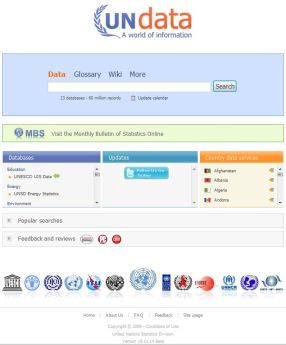
The site proclaims that it is a “world of information” and this is no exaggeration. Since its foundation, the UN has been collecting statistical data from member states on a huge variety of topics. As the site states, this is a considerable asset but it was stored across a large number of separate databases, each with different access policies.

UNCapture1

UNdata overcomes these problems by pooling these databases into a “single internet environment”, allowing access through a keyword search on the organisation’s home page. There is also a facility for advanced search and country profiles are provided.

The site claims there are over 55 million data points covering a wide range of themes including agriculture, education, employment, energy, environment, health, HIV/Aids, human development, industry, IT, national accounts, population, refugees, tourism, trade, as well as the millennium development goals indicators.

UNdata opens with a somewhat understated home page, “data” which centres on a search facility through which databases can be accessed. Type “health” for example, and 57 databases referring to health are listed. This is augmented by a simple menu system with four alternatives – data, glossary (which lists all the terms used in the databases), wiki (which provides access to a linked wiki which describes all aspects of the UNdata project) and advanced (which provides access to country profiles, advanced search and other features).

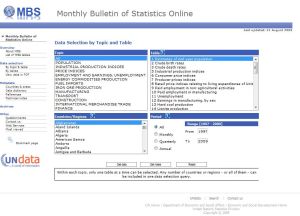
Below the search facility is a link to the Monthly Bulletin of Statistics (MBS) which provides economic and social statistics for more than 200 countries and territories. Under this is a section divided into three – Databases (which lists the key UN databases by category), Updates (which shows the latest additions to the databases) and Country data services (which provides links to the government data service of each UN member).

UNCapture2Clicking on a database name provides access to a fairly orthodox table, with columns typically for country, subgroup, year, source and unit value. The table can be sorted by any column and unwanted columns can be deleted. The tables can be turned into pivot tables or exported.

Whilst the front-end customisation features are relatively modest by Web 2.0 standards, a huge amount of work was obviously involved in bringing a large number of disparate databases together, integrating them on one site and displaying this volume of information in a consistent and accessible format.

If you want statistics on life expectancy in Africa or education in South America – or to find out how Australia performs in comparison to other countries in the world – this is the place to go. The country profiles are particularly useful, providing a statistical snapshot of almost all UN member states – and my one criticism of UNdata is that these could be better featured on the start page.

The second international site that I want to look at is linked to UNdata and picks up where it leaves off in terms of presentation. As the site states, Gapminder is a non-profit site “promoting sustainable global development and achievement of the UN Millennium Development Goals by increased use and understanding of statistics and other information about social, economic and environmental development at local, national and global levels”.

GapminderCapture1The site uses Trendalyzer software to convert tables into animated and interactive graphics. The site opens to four boxes – the two on the right devoted to videos of Gapminder in action, the left to the program itself. The main action is in the top left box, “Gapminder world”. Clicking on this leads to a graph which will show dynamically over time the changes within and between two national variables – for example, size of families and infant mortality, or urbanisation and population growth.

Depending on the variables chosen, the story that Gapminder tells can be extraordinarily vivid – and at times very depressing. Regions are depicted by different colours and its possible to tag specific nations to track their progress (or otherwise) over time. Maps can be attached to emails or blogs – I haven’t tested this, but it appears to send html code that links to the Gapminder site and loads the variables that you have used in the map.

GapminderCapture2It’s definitely worth viewing the tutorial and downloading the pdf document that summarises how the site works. You also need to experiment with the variables you wish to display and to play with the controls scattered around the graph (which could be a bit larger and clearer). Its also important to note that just because there appears to be a correlation between two sets of data does not mean that there is a causal relationship between them – and of course the quality of some of the statistics may be higher than for other data sets.

Verdict: Both UNData and Gapminder are invaluable tools for organisations interested in international aid or issues such as poverty, health or education, as well as those who want to benchmark Australia’s performance on key data sets against that of other countries. The two sites complement each other, so that the UNData site can be used to prvide a detailed snapshot of a particular issue – or through the country profiles, a picture of a specific country – whilst Gapminder can show in a vivid way the story of change over time.

The Trendalyzer software which powers the Gapminder site is available on Google Docs and I will look at it in a future post.

Posted in Community Sector, Statistics, Web 2.0 | Tagged , , | Leave a comment

Web 2.0 tools unlock statistics 2 – value-adding by the private sector

In my last post I looked at the release by the Australian Bureau of Statistics (ABS) of TableViewer, which demonstrates the increasing use of Web 2.0 by the ABS to provide greater access to census data. Now I’ll take a look at how Australian company .id (informed decisions) has taken this a step further to produce a range of user-friendly profiles which rely heavily on Web 2.0 strategies.

.id develops and hosts LGA-level (and in some cases, regional) statistical profiles using a range of sources. Over 180 council areas across Australia use one or more of .id’s products. Whilst local government makes up most of .id’s customers, local communities, businesses and non-government organisations are also key beneficiaries as most councils with .id products put public links to them on their websites, thus providing a free source of formatted, interactive tables, graphs and thematic maps.

.id’s range includes:

IDPROFILECapture

  • profile.id – a detailed social and demographic profile of a local government area. This is probably the most widely used .id product and has set the pattern for its other profiles. The basic format which allows users to select the relevant area (which could be a the whole LGA or a specific suburb) and then choose from a set of simple questions such as “how many people live here?”, “who are we?”, “what do we do?” and “how do we live” makes the data very accessible. It has also become the basis for the development of all the other .id products.
  • atlas.id – a social atlas of thematic maps for an LGA. This is a “supercharged” response to the ABS’s Mapstats, providing much greater interactivity and control.
  • forecast.id – a detailed demographic forecast for an LGA, broken down by customised local areas.
  • housing.id – provides analysis of an LGA’s housing patterns and trends.
  • economy.id – an economic profile of an LGA. This is .id’s latest and possibly most complex and ambitious project (click here for my review).

The .id website provides links to all the company’s clients and their .id profiles, most of which can also be accessed from the relevant council or regional website (though some links are easier to find on council websites than others).

Verdict: Whilst there is not enough space here to review in detail all the .id products, they are well worth checking out. The great advantages of these profiles is their accessibility, the extent to which tables and comparisons can be customised and the ease with which the resulting graphs and thematic maps can be downloaded.

For councils there is a significant upfront cost (upwards from around $25,000, depending on the product) plus an annual fee. However many councils consider that this is more than outweighed by increased efficiencies within councils, especially the savings in staff costs involved in preparing this data. In addition councils benefit from the improved data available to support planning and strategy development.

As previously indicated these benefits are shared by the wider community when these profiles are put online by the councils that have commissioned them, especially as the .id profiles are free to end users. The tables, maps and graphs produced from these tools can be pasted directly into community organisation reports and submissions, whilst businesses can learn an enormous amount about their local markets and the skills, size and demographics of the local workforce.

If you a scratching your head over whether to use ABS or .id profiles and other tools for your latest research project, here’s a suggestion.  The ABS products have more of a learning curve and are probably most useful for accessing metropolitan wide, state or national census data – or to construct tables which require a high degree of customisation (if you have the money to purchase the TableViewer subscription).

On the other hand the .id profiles are much easier to use and are specifically customised to provide LGA-level or regional census data as well as housing and economic information – provided your LGA or region is covered. If it isn’t then you will have to use the ABS tools.

Posted in Community Sector, Local Government, Statistics | Tagged , , , | 1 Comment

Web 2.0 tools unlock statistics 1 – ABS releases TableBuilder

Web 2.0 tools unlock statistics 1 – ABS releases TableBuilder

So far in this blog I’ve looked mainly at end user applications, but this is not the only area in which Web 2.0 strategies are appearing. Another aspect which is also beneficial to councils, small businesses, NGOs and other organisations is the increasing use of Web 2.0 technologies and interfaces to provide masses of free statistical data and, perhaps more imprtantly, to make this information easier to use.

The provision of statistical information by governments parallels the development of the internet, albeit with a substantial time lag. Up to only a decade or so ago, most government data was available only in hard copy. Some material was on microfiche, or, if you were really lucky, on floppy disk and eventually CD – and you were often charged for the privilege of accessing it.

Eventually and somewhat grudgingly governments started making data available online, but usually in the form of static tables on websites or in PDF documents. Even where it was available in spreadsheet format, the size of the files and download speeds at the time often meant that CDs were still the best format for distribution – and there was little or no customisation.

This started to change with the advent of broadband. The advent of Web 2.0, changing community expectations and government attitudes have also combined with the emergence of third party providers to make this data much more available and accessible. There has been a dramatic increase in the data provided online by governments and they have (mostly) given up charging for it.

One of the oldest of these Web 2.0-influenced government sites and the one probably best known to Australian organisations is the Australian Bureau of Statistics (ABS). The ABS has made material available online for a long time but has made increasing use of Web 2.0 interactivity, especially since the 2006 Census, to present census information through a range of products.

This process has greatly increased the accessibility of census data and also brought down the cost, as many of these products are free. Thus small businesses, community organisations and even individuals can develop their own profiles of their potential customer base, service catchment area or local community without having to hire consultants or researchers.

The ABS products which show the most Web 2.0 influence include:

  • QuickStats, which provides a summary of key Census data relating to persons, families and dwellings in user-selected locations, compared to national figures. This is the simplest and least interactive of the ABS Web 2.0 products and therefore has limited options – you choose a location and it displays a summary table. You have no choice over the data Quickstats displays and you can also only choose one location at a time.
  • MapStats, which provides thematically mapped Census statistics for a chosen location. It is step up from Quickstats, as you get to choose both location and data. In theory you also get to choose the geographic boundaries that will be used for the thematic mapping, but in many cases this is predetermined for you by the type of location you have selected. The maps which can be downloaded are quite effective but the lack of control over the level of boundaries used can be frustrating. You also can’t access the underlying data.
  • CData Online, which enables users to create their own tables of census data at levels ranging from a single collection district to the whole country. Unlike the previous products you can choose to start with either locations or topics and you have much greater choice over both. The resulting tables are very detailed and can saved in a workspace on the ABS website or downloaded. CData Online is obviously more influenced by Web 2.0 than the preceding products and is therefore much more flexible but it requires a fair degree of work to produce the result you want.

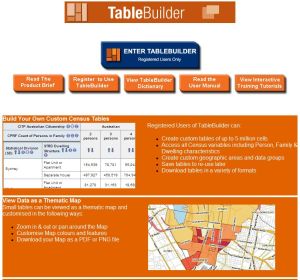
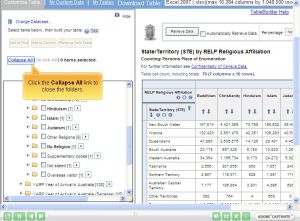
TableBuilderCapture The ABS has just added substantially to its Web 2.0-enabled stable with the release of TableBuilder. This new online tool allows users to create their own tables of census data by accessing all variables in the census output record file for all ABS geographic areas. Users are able to prepare their own cross-tabulations and smaller tables may be exported or viewed as a graph or a thematic map within the product, whilst large tables can be downloaded to the desktop for further manipulation.  


In effect, TableViewer combines almost all the features of the other ABS Web 2.0 census-based products – but all this comes at a price. TableViewer is a charged subscription service costing $1,655 (including GST). This price is for individual users for a “single Census reference cycle” and includes online training and ongoing help-line support.

TableViewer is a very sophisticated product which allows a much finer grain of manipulation of census data online by the end user than even CData Online does. Whilst a trial version is not available, the online and interactive Tableviewer tutorials provide a good idea of what the product can do and how it performs.

TablebuilderCapture1

Whilst the ABS products provide a wealth of census information in an accessible format, a Melbourne company, .id (informed decisions), has taken Web 2.0 concepts a step further to produce a range of user-friendly interactive profiles. These I’ll take a look at in the next post.


Posted in Community Sector, Local Government, Statistics, Web 2.0 | Leave a comment

Running an interactive forum in the 21st Century – Poll Everywhere

In my last post I discussed three web-based mind mapping programs that could transform workshops and brainstorming sessions for small organisations (a discussion I’ll continue in future when I look at other mind mapping software which has online collaboration facilities). In this post I’ll take a look at a tool that could revolutionise how councils, NGOs and others run larger forums, campaigns and even, for NGOs, fund-raisers – Poll Everywhere.

A number of programs such as PollDaddy, SurveyGizmo, SurveyMonkey, QuestionPro and Zoomerang provide facilities for structured online surveys, but Poll Everywhere offers something distinctly different – voting via SMS text messages from mobile phones in real time.

As the Poll Everywhere website suggests, using Poll Everwhere is very simple. For example, if you are holding a forum, all you need is a Poll Everywhere account plan (more on these in a moment), a computer with an internet connection (and ideally a data projector to present results) and an audience equipped with mobile phones.

You then ask your audience a question and your audience send their responses using text messages, twitter or via the web (if they have a PC or smart phone). The results are then displayed in real time.

That’s it, really! But to go through the process more slowly, Poll Everywhere offers three sorts of polls:

The simplest are multiple choice polls where you set a question and provide a list of answers. Each answer is automatically provided with a five-digit code number and, in more expensive plans, a custom keyword. Forum participants then text the code number or word to a mobile phone number. Local numbers are available in Australia and the UK and short number codes in the US and Canada. The UK/Australia numbers can also be contacted from a number of other countries (participants will incur a charge from their mobile carrier for their text message, depending on their phone plan, their location and the number they are texting to).

The poll result is then automatically collated and displayed. As indicated before, participants can also vote via twitter or the web.

The following screenshot shows the poll editing screen with a sample multiple choice poll:

PollCapture1

As can be seen, you can set parameters such as whether participants can vote more than once, whether they will receive a confirmation message and the methods for responding.

As everyone votes, Poll Everywhere collates the results in real time and displays them on a graph. In the following example, two people have voted for Policy 1, one for Policy 2 and none for Policy 3:

PollCapture2

These results can also be downloaded in a spreadsheet.

Multiple-choice polls are obviously ideal for choosing between different options at strategic forums or even for voting for candidates. Voting can be done anonymously, cheaply and quickly and there is no down-time collating the results.

In many forums, however, prioritising options comes at the end of the process. First, you may want to get a list of ideas, suggestions and/or questions from your audience. Poll Everywhere also provides the ability to do this with free-text polls, a facility to ask open-ended questions to which the audience can respond with text messages, tweets or via the web. This option will test the texting skills of your audience, which may cause some complaints, but at least it will keep the responses short!

The third type of poll is the pledge poll, which allows people to pledge funds for a cause. Unlike the other polls, this one obviously requires the participants to be identified – this can be done, but it requires an upgrade to a paid plan.

On the subject of plans, Poll Everywhere has a free plan with limited features (such as only 30 responses per poll) which lets you access enough of the facilities to evaluate whether the program is suitable for your purposes. There are then a range of plans which allow more responses and access to an increasing number of features such as additional account users, respondent identification, customised keywords and text moderation.

Plans can be upgraded and down graded on a monthly basis. For most small groups, the US$15 a month personal plan which allows up to 50 responses per poll may be adequate; if you are running a larger forum the presenter (250 responses) or plenary (700 responses) options, which cost US$65 and US$140 a month respectively, may be more appropriate.

Verdict: Poll Everywhere offers a very tempting and cost-effective approach to gathering information and conducting polls in workshops or forums. Whilst it should never be seen as an alternative for proper discussion of policy and strategy options, it could be used judiciously to enhance this process, allowing for different questions to be asked and options tested in real time at the meeting. It could also be used very effectively in a brainstorming process with the mind mapping software I have been discussing.

The downsides appear to be limited. Obviously, ongoing costs are significant if you are on one of the higher-end plans – but you can upgrade and downgrade on a monthly basis. Your will need a computer with good internet access at your venue – and good mobile phone reception as well. If you think a significant proportion of your audience are going to have problems with texting or don’t have access to mobile phones, this solution might not be for you – however, if you only have a few participants in this category you could always provide a couple of computers with internet access to allow voting via the web.

As always, you should look at the issues I raised in a recent post about avoiding problems with Web 2.0 applications in evaluating Poll Everywhere. If you do decide to use it I would also suggest a dry run as well as taking a backup voting process to your meeting, forum or workshop.

Addendum: I was contacted by a Poll Everywhere representative after posting the above post (click on the comments flag to see his feedback), who kindly answered a few more of my questions. I was curious about time lags – he assured me they weren’t a problem, as it was statistically very unlikely that two very large (1,000+) polls would be held at the same time and numerous concurrent small polls are not a problem.

Keywords, which are available with the larger plans to replace code numbers, are provided on a first-come first-served basis, so if a common word isn’t available for a particular option when you are holding your poll you may have to be a little more inventive in your choice of keyword.

I’ve also edited my comment in the post regarding Poll Everywhere’s phone numbers to clarify that there are other numbers as well as an Australian number for people to send their text messages to and also that sending a message will a incur mobile carrier charge.

Posted in Community Sector, Local Government, Meeting tools, Polls and Surveys, Web 2.0 | Tagged , , , | 3 Comments

Mind Mapping and Web 2.0: Part 1 – web-based tools

Over on our other blog, StrategyMatters, I’ve been looking at a key strategic thinking and planning tool, mind mapping software. In this post I’ll start to look at the interaction of mind mapping software with the web and a warning – this is a longish post!

First, what is a mind map? Wikipedia offers a good definition:

“A mind map is a diagram used to represent words, ideas, tasks, or other items linked to and arranged around a central key word or idea. Mind maps are used to generate, visualize, structure, and classify ideas, and as an aid in study, organization, problem solving, decision making, and writing.”

As I said in the relevant StrategyMatters post, mind mapping has been around for a long time as a manual, pen-on-paper exercise. Organisation brainstorming sessions often use a loose form of manual mind mapping with less than satisfactory results, but now software has been developed to make the process much easier and more efficient.

There are dozens of mind mapping programs out there, but most work the same way, allowing users to add ideas as branches to a core concept. The software allows users to move these ideas around the resulting tree on screen, detaching them from one branch and attaching to another, and to add new ideas as sub-topics to these branches.

Most programs also allow you to prioritise these topics and sub-topics, to format them in other ways and to add information such as deadlines, resources, document files and web links. Not only can these programs provide a simple, visual one-page map as record of a planning or brainstorming session – these maps can also become effective “live” management documents for implementing an organisation strategy or managing a project.

Whilst mind mapping software started out as conventional PC and Mac based programs, it has evolved in interesting ways. Some programs have stayed in this conventional mould. Others remain computer based, but also have options for uploading, storing and sharing maps on the web – and, in some cases, for shared online collaboration.

A third emerging category is those programs that are entirely web-based, with maps stored online and accessed though a browser. Obviously this facilitates sharing, but it also makes it easier for single users to access their maps from any computer.

I’ll have a brief look at the last two groups, starting off in this post with the fully web-based applications. Three good examples are Comapping, Mindomo and MindMeister. Both the latter programs offer both free and charged accounts, though free account holders can access only a basic version with limited features (MindMeister however offers a time-limited trial of its fully-featured premium version). Comapping offers only a 30-day trial but the trial version is fully-featured.

Cost: All three programs make it easy to sign up and get started. However, to obtain access to additional features you have to sign up for at least the “premium” version of either Mindomo (a monthly charge of US$6) or MindMeister (US$4 a month). Both programs also offer closely-matched “business” and education/academic versions with some additional features. Comapping comes in a single version, which costs US$15 for 6-month and US$25 for annual subscriptions. Comapping also offers group, class and company subscriptions.

Interface: All three programs observe basic mind mapping software conventions regarding the creation of new topics and sub-topics, the ability to move topics around the map and the expanding and collapsing of branches. The creators of Comapping and Mindomo have opted for Office 2007-style tab and ribbon formats for their commands, with a button in the top left corner allowing access to the most basic commands. This has the advantage of familiarity for many users, but the downside is that because the map window is already in a browser there isn’t much area left for the map itself in either program if you are accessing it from a notebook computer, especially one with a small screen.

Mindomo’s ribbon layout is reasonably intuitive, but with some unexpected twists. For example, text formatting is under the Home tab and not in Formatting. It is also annoying that at least in the trial version a column of ads appears on in the right sidebar, taking up even more space.

Mindomo screen:

MindomoCapture

Meanwhile, Comapping’s limited feature set (more on this later) and lack of advertising means that its interface is relatively straightforward.

Comapping screen: 

ComappingCapture

Comapping also appears to try to make virtue out of necessity by offering only a right-facing map. This makes better use of the available real estate on a notebook screen, but is somewhat limiting, especially as you cannot vary the spacing between topics. However you can change the map’s focus to topics other than the main topic and at least there are no annoying advertisements.

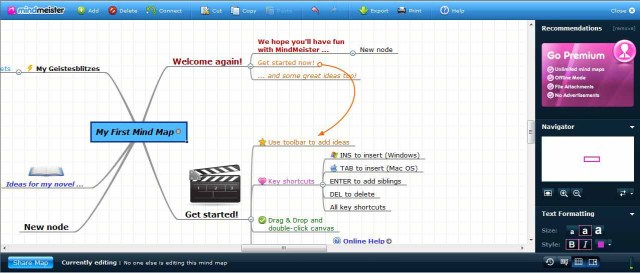
Meanwhile MindMeister has a different approach. Across the top of the browser window is a narrow bar with basic commands only. Other commands are contained in tabs on the sidebar. Whilst it provides more real estate for the map in the browser window, this causes another problem for notebook users – if several of the uppermost tabs are open, the bottom ones are pushed off the screen.

MindMeister screen:
MindMeisterCapture


This situation isn’t helped by the fact that the MindMeister sidebar contains “recommendations” (ie, advertising) which can only be removed by purchasing the premium version. Even if your screen is big enough to have all the tabs fully open, it isn’t easy to work out what options are available.

Feature set: Both Mindomo and MindMeister offer a reasonable set of features, though neither is as comprehensive as the range of features in a “conventional” commercial program such as MindManager. However, you can insert icons and images, add task information and attach notes and web links. Both programs also allow you to attach files but these first have to be uploaded. Mindomo can also handle audio and video files but these have to be available on the web in the first place.

Mindomo has by far the biggest range of map and topic formatting. There are 20 predetermined map layouts and individual topics can be given different shapes. Topic text font, size and colouring can also be changed and bold, italic and underline styles applied.

In MindMeister there is only one style of map and node shape, whilst only text style, size and colouring can be varied. MindMeister however does provide a history view and a “geistesblitz” (mind flash) facility, which allows users to insert topics directly from a sidebar, browser or via email or SMS.

Comapping  also has a limited feature set. Again, you cannot change the basic map style or format topic shapes but you can change the colour and size of text and apply a background colour. You can insert a hyperlink  for the whole map and as well as for individual topics – however some of the editing options only appear when you are actually editing the topic. Comapping does not have predefined images, but if you attach a graphics file to a topic it will insert a thumbnail image of the file.

One feature is unique to Comapping, however; its presentation mode allows users to drag topics onto the ribbon to create a slide show focussing on these topics in the order selected. This is actually quite clever and easy to use. Other Comapping users can view the presentation on their computers by clicking on the Join Presentation button in their tool bar and the map can be edited in presentation mode.

Mindomo and MindMeister offer the most comprehensive help facilities with detailed instructions and FAQs. Mindomo also has a forum, whilst MindMeister offers an online tutorial. Comapping has the most limited support, with only an FAQ and “Tips & Tricks”.

Accessibility and sharing: All three programs allow map sharing by inviting colleagues as well as posting them publicly on the web. MindMeister explicitly allows groups to work on the same map at the same time – and so, apparently, does Comapping – but neither program makes it clear how conflicts are handled. Mindomo does not indicate if it is possible to work collectively on the same map at the same time.

Both MindMeister and Comapping have downloadable versions which allow users to edit maps when they are not connected to the internet. MindMeister’s offline version is free as long as you have a premium or team subscription, but it requires Google Gears and a fairly complex installation process. Comapping’s offline version costs US$99 and requires Adobe AIR. Mindomo have not yet released an offline version, though one is in development. Business and academic users can however get a server based version.

Import and export: The basic versions of Mindomo and MindMeister can export image, PDF and Word (RTF) files, but a signup to the premium version is required in both programs to export more sophisticated formats such as MindManager. The premium version of Mindomo can export MindManager, Microsoft Project (MPX), Excel and HTML files whilst MindMeister can export to Mindmanager and Freemind. Comapping has a similar range to Mindomo, allowing export to RTF, MindManager, Freemind, HTML, Project and OPML files.

The ability of all three programs to export to MindManager and of Comapping and MindMeister to export to Freemind is especially significant. Although neither the commercial MindManager or nor the open source Freemind (or any other program) dominates the mind mapping market in the way that Microsoft does with office software, both have a large base of users and a number of other programs can also import their files. On this front all three programs can import maps from Freemind and MindManager.

The ability to export to common file formats also provides a simple way for users to back-up their mind map files off-line (which is relevant in the context of what I wrote recently regarding Web 2.0 services and data security) and to access these files easily using other software if required.

Verdict: Unlike Comapping, Mindomo and MindMeister both provide free versions – but these are very basic. Once payment is involved, the playing field is a little different. Comapping is the cheapest over 12 months at US$25, whilst MindMeister will cost US$48 and Mindomo US$72.

Comapping and MindMeister have an edge in online collaboration and both provide offline facilities (though you pay extra for Comapping’s software), whilst Comapping and Mindomo have a wider range of export options. MindMeister and Comapping have the most limited options for map formatting, though Comapping alone offers a very useful presentation mode. Mindomo has by far the most comprehensive range of formatting features.

Both the Comapping and Mindomo ribbon-based interfaces are reasonably intuitive and even for new users would be easy to pick up. This contrasts with the MindMeister interface, which seems to require more visits to the online help to understand.

I think that Mindomo offers the best balance of features and ease of use and would probably suit single users – especially those who have previously used other mind mapping programs – or small groups who want to share files, but not necessarily work on them at the same time. Both MindMeister and Comapping may be best suited to workgroups who want to collaborate intensively on maps in real time. Of these two, Comapping probably just wins out, especially for larger groups, because of its ease of use, presentation facility and lower cost per user.   

However the great thing is that all three programs allow potential users the opportunity to try them out for free. I would suggest giving all three a trial to determine what suits you the best. It should also be noted that I haven’t had time to apply all the tests I suggested in my last post about avoiding problems with Web 2.0 services – but you are strongly advised to look at these issues in evaluating these products.  At the very least you should use the ability of all of these  programs to export MindManager and Freemind files to provide off-line backups of your maps in either format.

In a future post I’ll look at the web-based collaboration of the more conventional mind mapping programs such as MindManager.

At Gooding Davies Consultancy we use MindManager extensively and can provide a range of strategic planning and program management solutions for your organisation based on this versatile program. We can also advise on solutions using the above products.

Posted in Community Sector, Local Government, Mind Mapping, Web 2.0 | Tagged , | 5 Comments

When Web 2.0 “goes bad” – part 2 – simple steps to help evaluate services and avoid problems

In my last post I looked at three examples of Web 2.0 services that had changed in unexpected ways and the impacts on their users. I also identified some of the associated issues with Web 2.0 applications, including data security, service closures or change in focus, the ability to extract data and unanticipated changes in fee structure.

Its time to look at some steps councils and small organisations can take in evaluating Web 2.0 applications they are interested in. But first, an extra disclaimer – the web is a volatile place and Web 2.0 applications are particularly subject to market forces and competitive pressures. In other words, there is no guarantee that even if you do thoroughly evaluate a service it won’t change in the future, possibly in ways that you don’t like.

So, what can your organisation do to help protect itself when looking at a Web 2.0 service?

  1. Evaluate what the service does and how well it does it. Don’t be seduced by the hype – most Web 2.0 services have a free version which you should systematically evaluate (though these often involve a cut-down feature set). If you are seeking an online replacement for an existing application it should be easy to develop a checklist of your requirements; if the service promises something which you don’t already do, you still need to check that in fact it can deliver on this promise. Also check out how easy the service is to use, how quickly it loads and runs, what browsers it is happiest with and, if there are different service levels, what additional options they provide (see next point).
  2. Confirm exactly what you are paying for. Beyond the limited free version most sites provide two or three service levels with increasing fees, usually paid for on a monthly basis. These service levels may be distinguished by different features and/or different limits on the number of users or concurrent projects. Make sure you are not paying for a higher service level than you actually need; if you require additional facilities for a once-off project, some applications will allow you to upgrade and downgrade on a month-to-month basis. Also find out how much notice you need to give to terminate a service – again, this can usually be done on a monthly basis.
  3. Find out about storage, data security and backup systems. Check out if the service website provides information on how data is stored, whether there are adequate back-up systems and how secure your confidential data will be. If there is no information on the website, contact the service provider to request this information.
  4. Clarify if you can extract data to backup and use outside the service. It’s important to sort out whether and how easily you can download this data and the formats in which it is provided, especially if you want to integrate information with other services or applications. How important this facility is depends on the nature of the service and the value of the data; for example, for online survey services you probably only need to be able to download the questions and the survey outcomes, whilst for online databases you would need to able to backup the whole database offline.
  5. Setup your own backup systems.  Obviously you will also need to setup your own systems to backup downloaded data. If the Web 2.0 service you want to use is event related – for example, Poll Everywhere, which provides a mobile phone-based polling and voting facility for meetings – consider the possibility that the internet might be down on the very night you are holding your meeting and take along a manual voting system as a backup (I’ll review Poll Everywhere in a future post).
  6. Assess the service’s maturity and popularity. Find out how long the service has been around and how often it has been updated – and whilst this may be harder, try to get a sense of whether it is attracting interest and users. Obviously an application that has been online for longer than a year or two,  has been updated a few times and appears to be popular is likely to be more stable and financially viable – though newer services are worth considering if they appear to be well-designed. Also be wary of older services that look like they have been neglected for a while and seem to have few users. These services could be struggling financially and the owners may already have plans to close them down.
  7. Review service guarantees and support arrangements. See what if any promises are provided about continuity of service provision and carefully review the application’s user help and support arrangements. At a minimum, Web 2.0 service sites should provide a set of frequently asked questions and answers as well as an email address or form for support requests. Better sites will also provide product tours, webinars and/or tutorials on the service’s key features, knowledge bases, a list of tips and tricks, templates (if appropriate) and user forums.
  8. Test the service provider’s response to support requests and feedback about product development. If you have any questions regarding the service after trialling it, ask them. Apart from getting an answer, this will also test the site provider’s responsiveness. Likewise, provide suggestions about the service and how it could be improved. Most service providers appreciate feedback and may indicate whether your suggestions are being considered for a future version.
  9. Check out the views of users and reviewers. Some services will list prominent companies using the service and may even provide testimonials. Other Web 2.0 services may host user forums which can provide an insight to common problems. These may be moderated, however, so you should also search the web for references to the service in independent forums or blogs by either users or reviewers.

These are just a few suggestions for your council or organisation to consider in evaluating Web 2.0 services – please leave a comment if you have any additional ideas on how to review and choose web-based applications.

Posted in Social Media, Web 2.0 | Tagged | 1 Comment

When Web 2.0 “goes bad” – part 1

What do a social bookmarking site, a web-based database and a social networking service mainly used in Vietnam have in common? The answer is that all of them have either recently changed, or are about to change, in ways that will disrupt thousands of their users – thus providing a timely lesson for everyone who depends on social networking or other web-based applications.

Services on the social bookmarking site, Ma.gnolia, stopped abruptly in January 2009 when its host computers suffered a database crash, irretrievably losing all the site’s data, according to Data Center Knowledge. The Ma.gnolia site, which was apparently hosted on two Mac OS X servers and four Mac minis, now carries an announcement that it will be reborn as a as a “by-invitation community bookmarking service”.

More recently the owners of Blist, one of the better-known online databases, announced that the site is morphing into Socrata, which will concentrate on “delivering social data discovery on government data sites around the world”. No doubt this has the potential to be a useful service, but the news must have come as a surprise to current Blist users who will apparently lose the original service in August.

Even bigger companies aren’t immune from these changes. Just ask the Vietnamese users of 360 Degrees, Yahoo’s social networking site. Whilst 360 Degrees failed to make an impact on Myspace and Facebook, it was an unexpected success in Vietnam, where in a country with strict government controls on information and dissent it became the dominant social networking service.

Yahoo announced that the service would close in 2008 but, according to the EarthTimes website, it is only now that the 13 July cut-off date is looming that many users are hurriedly trying to migrate their data to alternative sites or Yahoo’s Vietnam-only replacement service.

These three examples demonstrate why councils as well as public and private sector organisations need to exercise caution in choosing web-based applications to use in managing their operations or in providing services to residents, clients or customers. They also illustrate some of the potential issues that users need to consider in evaluating Web 2.0 services. These include:

  • Data security: whilst the Ma,gnolia example of a catastrophic loss of data is thankfully rare, it does demonstrate that these things can happen. Potential users need to assess whether the services they are interested in provide adequate storage and backup facilities. More common concerns are whether and how online services maintain the confidentiality of the data that users or thier clients or customers store on their sites.
  • Service closure or change in focus: again, whilst complete service closures are very rare, the Yahoo 360 Degree shut-down illustrates that they can happen. Even a change in focus such as that underway at the former home of Blist can amount to a service closure for dedicated users of the service being replaced.
  • Service downtime: all websites can be affected by brief periods of downtime for essential maintenance or uploading software upgrades. These interruptions should be rare and advised to users well in advance.
  • Ability to access data: users need to be able to access and download easily any data that they store on a Web 2.0 site, as well as contact information for their clients or customers.
  • Upgrades and backwards compatibility: from time to time, all online services need to upgrade their services. These upgrades should be advertised well in advance, along with advice on whether users need to change any of their settings. Apart from the downtime involved, users will need to check whether there are any compatibility issues with new versions of software.
  • Fee changes: users need to check out the different fee levels on web-based services – and how easy it is to terminate an agreement or change the level of service. They also need to be mindful that fees, service levels and conditions can be changed at any time by the provider.

Whilst these is an obvious need to proceed cautiously, these concerns should not be used as an excuse for councils and other organisations to not engage at all with social networking or other Web 2.0 applications. In my next post I will outline some practical safety checks for users to apply in evaluating these applications.

Posted in Social Media, Web 2.0 | Tagged | Leave a comment

Web 2.0 tools for the “back of house” – part 2: MyCommittee review

In my last post I outlined some of the key steps for small non-government organisations and councils in managing board and committee meetings, highlighting the difficulties in finding a single program that would manage these tasks.

So far I have found only one Web 2.0 application specifically targeted to these processes: MyCommittee. This is a classic Web 2.0 program – hosted entirely online and managed through a web browser. All the data is also stored online and you can purchase different feature levels, paying for the application on a monthly basis.

Charges range from free (effectively a trial of the program, allowing you to set up one committee only with only 1 Mb of storage and limited features) through personal (US$19 per month, five committees and 200Mb of storage), standard (US$49, 15 committees and 1Gb) and premium (US$99, 35 committees and 3Gb) to enterprise (US$149, 100 committees and 10Gb). All paid levels of the program allow access to the full range of features.

How does MyCommittee work? Well, to quote the website:

“MyCommittee allows you to create and share indexed meeting agendas, minutes and documents and provides your members with a central location to collaborate and stay connected between meetings. It is designed especially for committees, boards and other groups that have regular and recurring meetings.”

After you have registered and created your own profile you set up basic information about your first committee, such as its name, meeting schedule and terms of reference. At this stage you also create standing items that occur at the beginning or end of every meeting.

You then access a dashboard with a number of tabs covering activities such as nominating committee members and other significant contacts, uploading documents and of course creating meeting agendas.

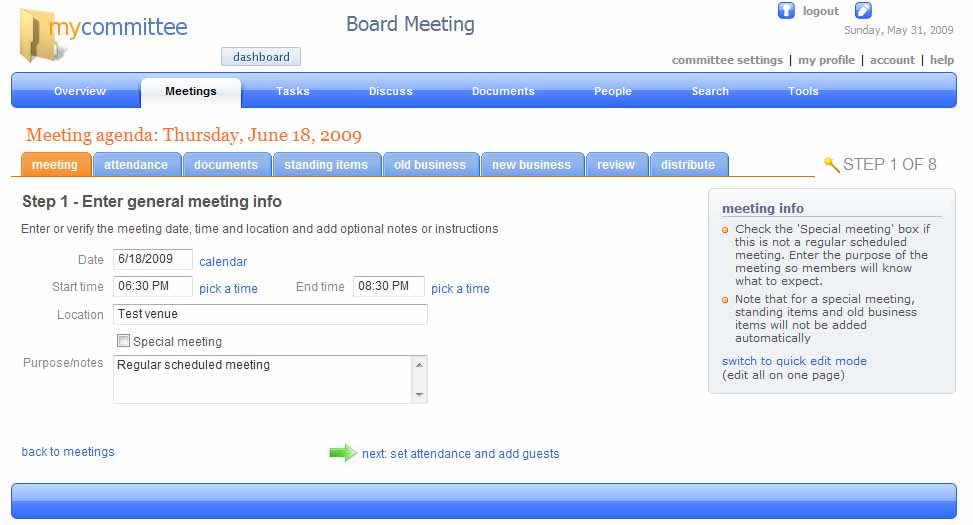
Choosing this option takes you to a set of new tabs which cover the sequence of creating a new meeting for the committee. You have the option of using the tabs or a wizard to step you through the creation of the agenda – or you can prepare the document in one go. MyCommittee screen 1

The wizard starts with general information about the meeting. The second step is to input meeting attendees from the committee’s membership, plus any guests. The third step allows you to upload and attach documents and the fourth to confirm the standing items. The fifth provides an option to incorporate “old items” – what might generally be called business arising, or items deferred from the last meeting.

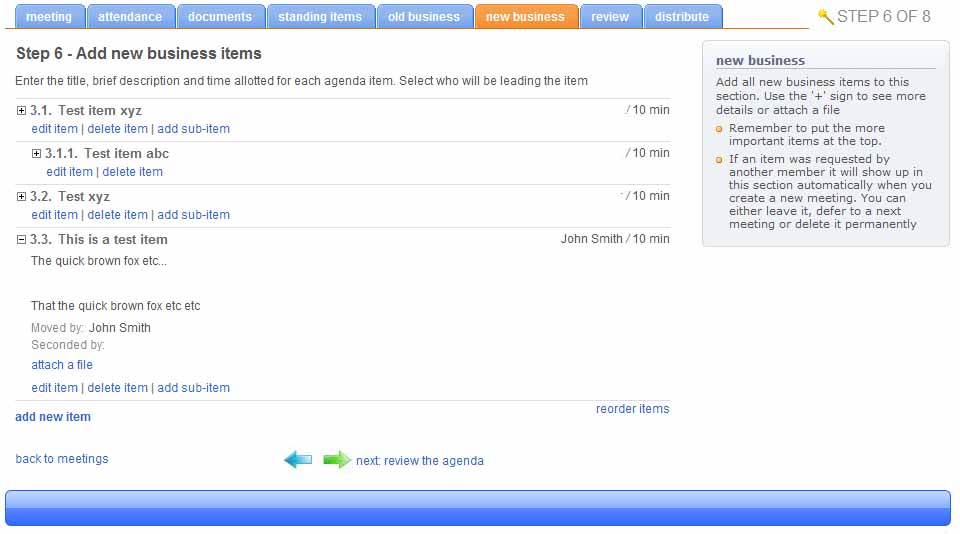
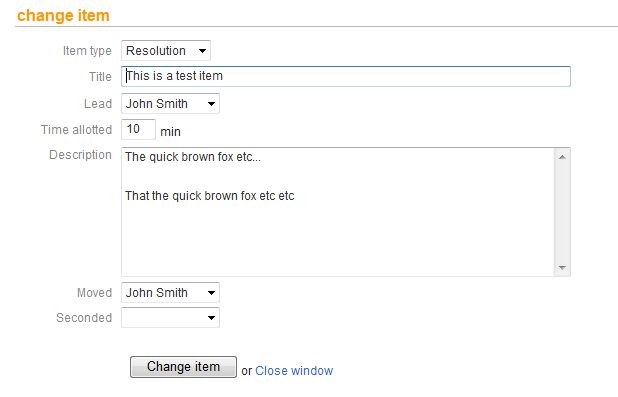
MyCommittee screen 2The sixth step is the guts of the program where general business items are created. Sub-items can also be created, in effect allowing the creation of headings under which items can be grouped (though this could be better implemented). These items can be either be discussion or resolution items – if the latter is chosen, then additional fields for mover and seconder appear with a drop-down list of the names of attendees, though these can be left blank at this stage. Documents can also be attached to individual items.

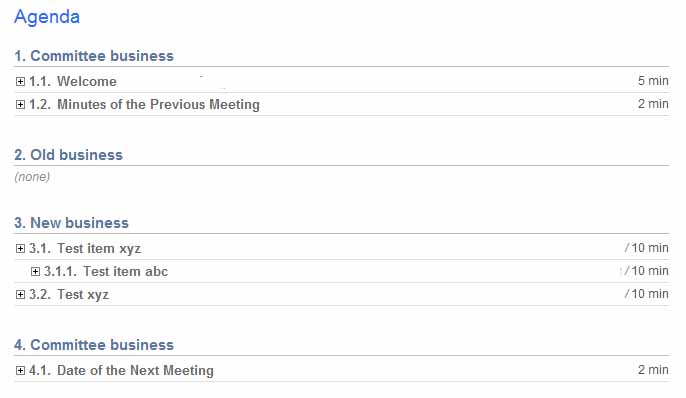
MyCommittee Screen 3In the seventh step the agenda is reviewed and then in the eighth and final step the agenda is distributed. Every attendee receives a notification of the meeting, the items (if any) that they are required to lead and a link to the stored agenda on the MyCommittee website. PDF versions of the agenda (and minutes) can also be created.

Whilst MyCommittee doesn’t go out of its way facilitate real-time use in actually running a meeting, the minutes wizard – basically a cut-down version of the agenda wizard – can be used during or after the meeting to prepare the minutes. Each resolution item now has extra fields to record what the decision about the item and whether it has been resolved or is still outstanding.

MyCommittee Screen 4There are a number of additional features, especially for purchasers of the paid versions of MyCommittee. For example, you can automatically create tasks for members from action items identified during the meeting which will show up as business arising at future meetings – though these have to be added as separate items rather than being attached to a previous business item. Committee members can comment on agenda items online and there are facilities to discuss any subject, take polls of meeting attendees and search previous meeting minutes for information.

Verdict: there is a lot to like about MyCommittee – which is just as well, because so far it is one of a kind. Although there is a small learning curve, it would suit a small to medium organisation that has reasonably but not excessively complex agendas and which needs to handle attachments. Its interactive features would also suit organisations with active committee members, especially if the task management features are adequate for their needs.

The program still needs refinement, however. Whilst it is well laid out the interface can still be confusing and sometimes you lose track of exactly where you are. MyCommittee could also do with a split-screen presentation mode so that it could be used to actually run a meeting as well as recording the minutes. The task management feature is problematic for organisations with a staffed secretariat as it appears that actions can only be scheduled for committee members. The ability to change some of the terminology and to customise the layout of agendas and minutes, especially in the PDF versions, would also be helpful.

The biggest omissions however are the inability to view resolutions in anything other than chronological order and the lack of any facility to extract them for storage in a separate database. This would be a major problem for those organisations that need to track or refer to resolutions. The program’s creators have indicated that these features might be included in later releases, so organisations that need these facilities might consider holding off until they are implemented.

Posted in Community Sector, Local Government, Meeting tools, Web 2.0 | Tagged | 5 Comments